Room Devices — screen guide
Room Devices is step 5. You pick one room at the top and set up everything in it: lights, scenes, curtains, AC and fans, TV and audio, music and door phones. Changes save by themselves and reach the house and the phones at the next Save & Deploy. Task article: Crestron joins.
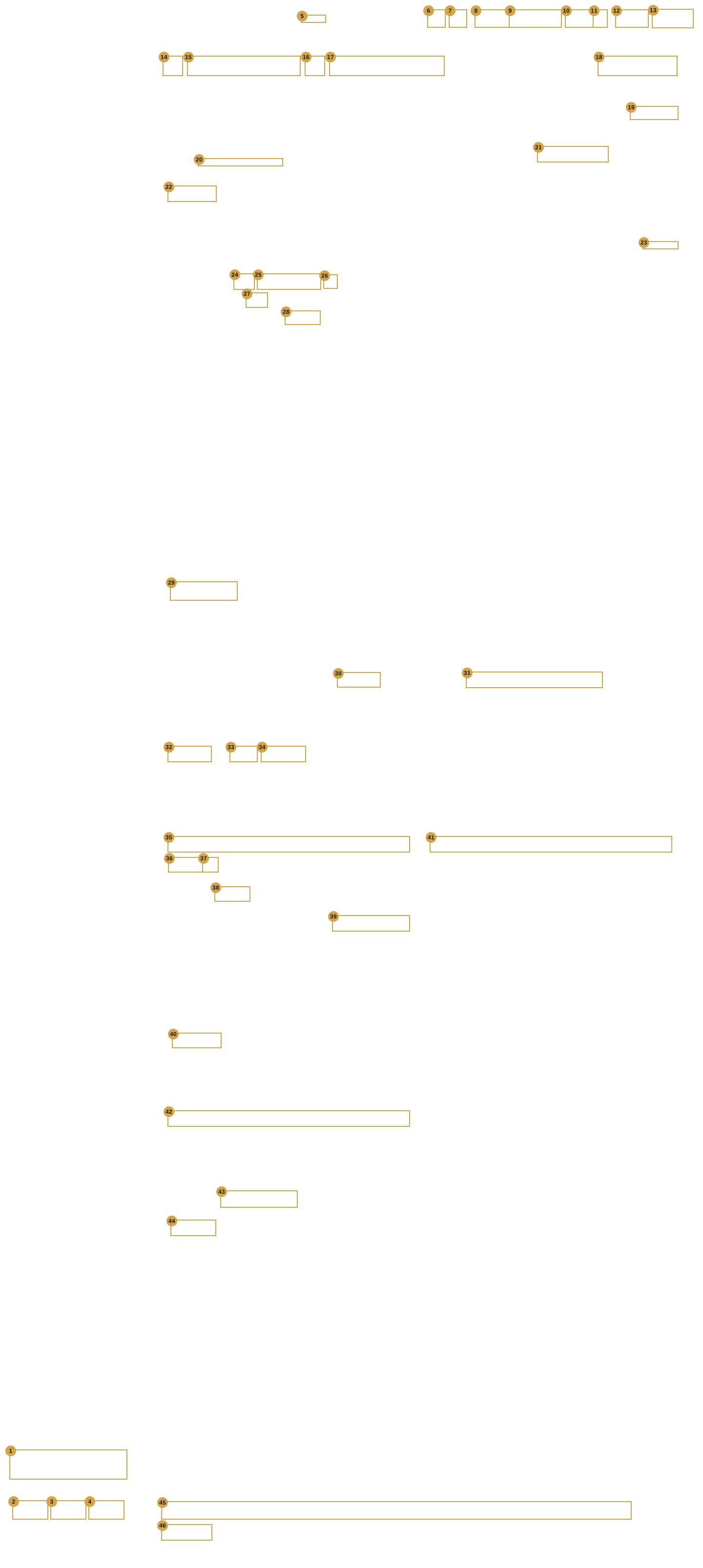
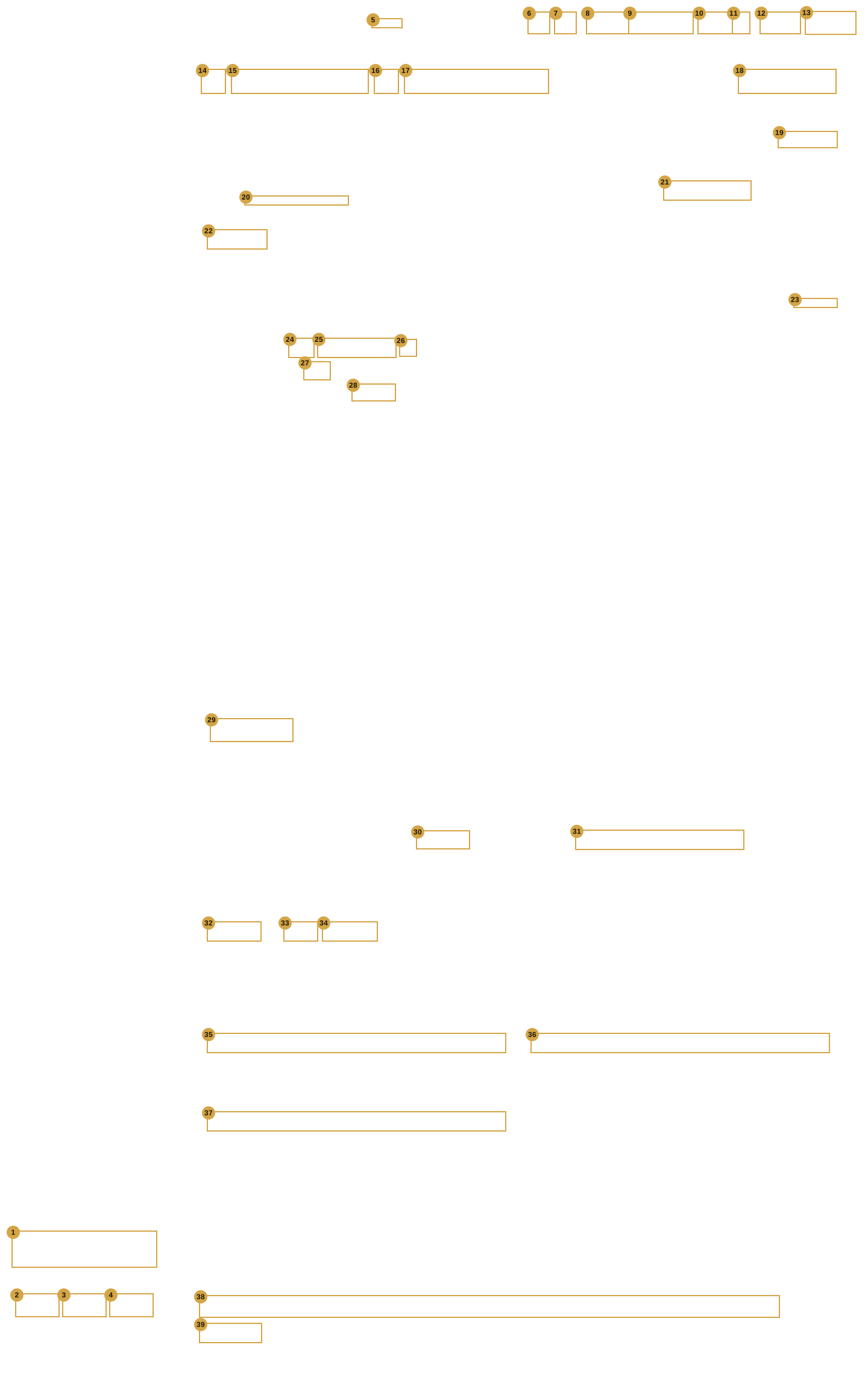
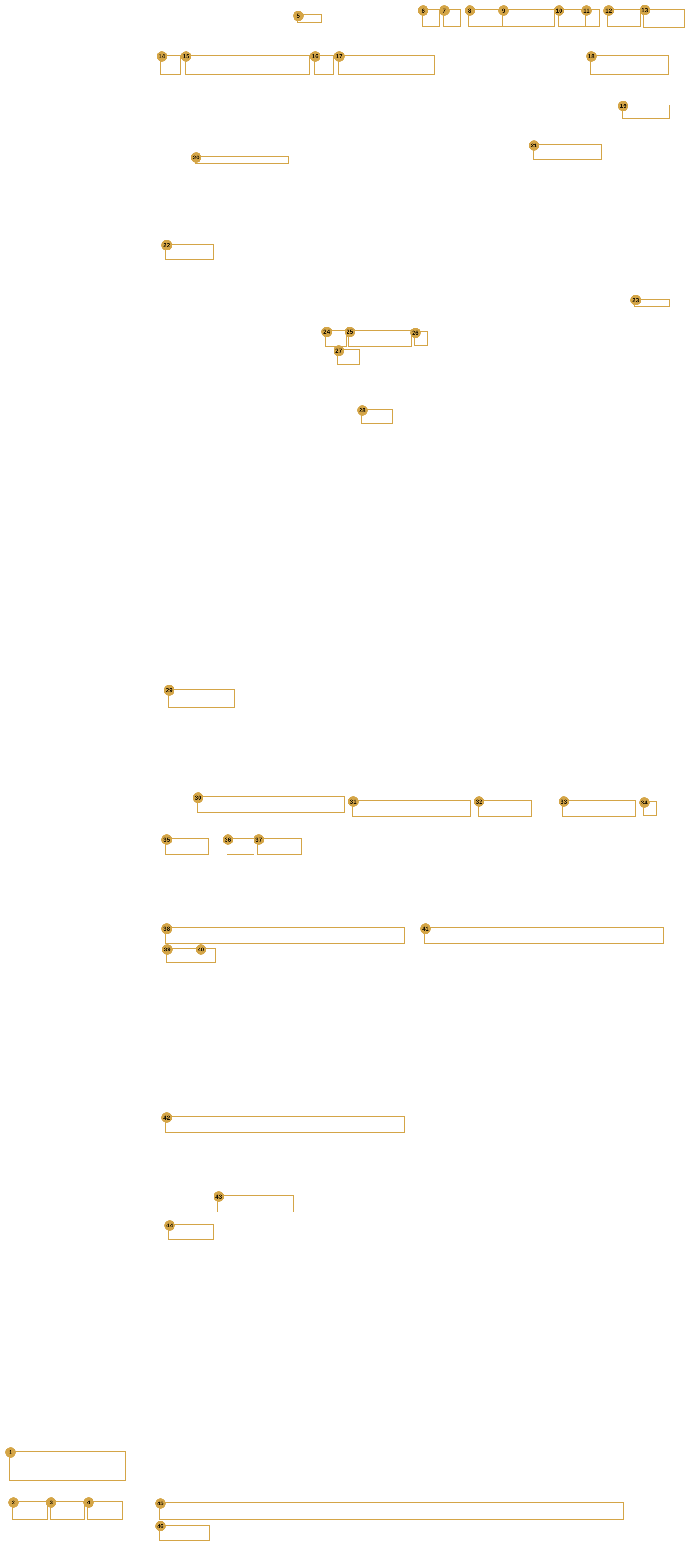
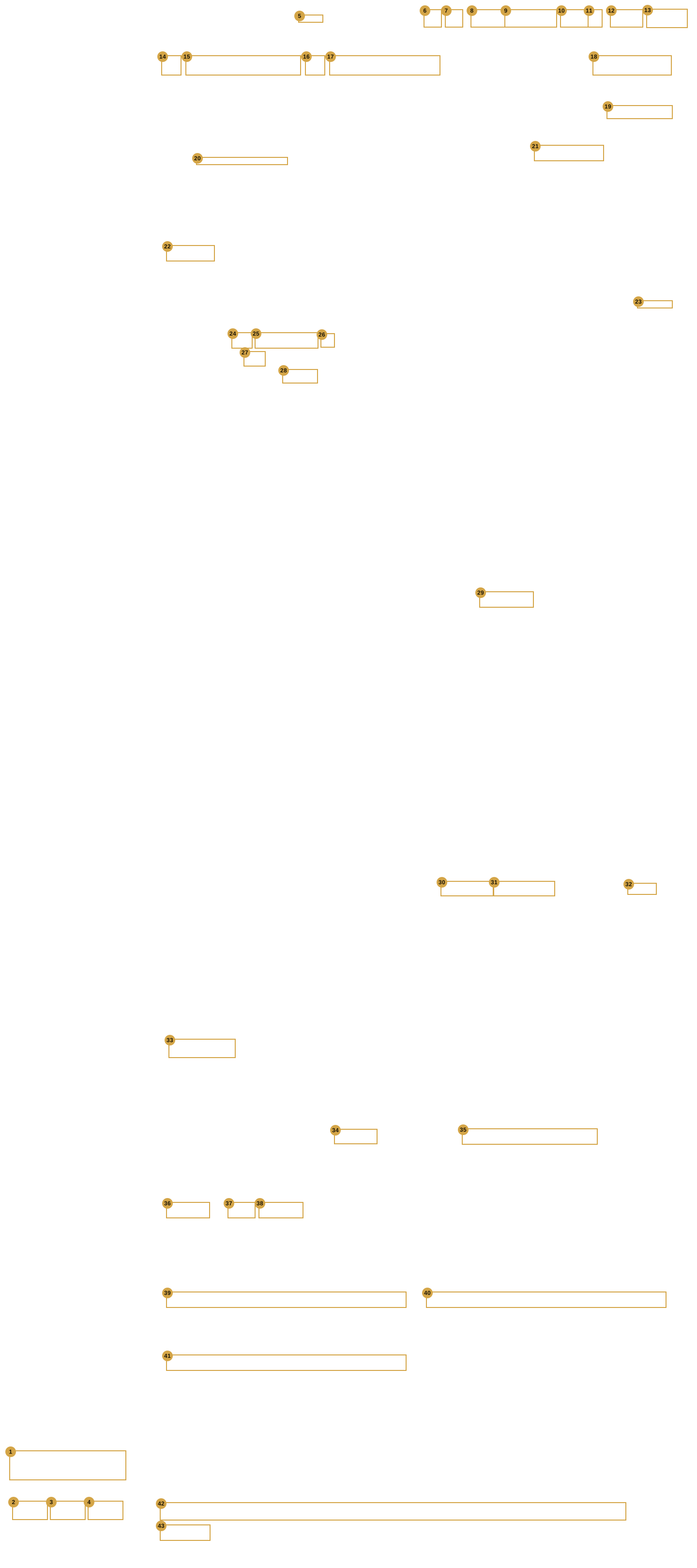
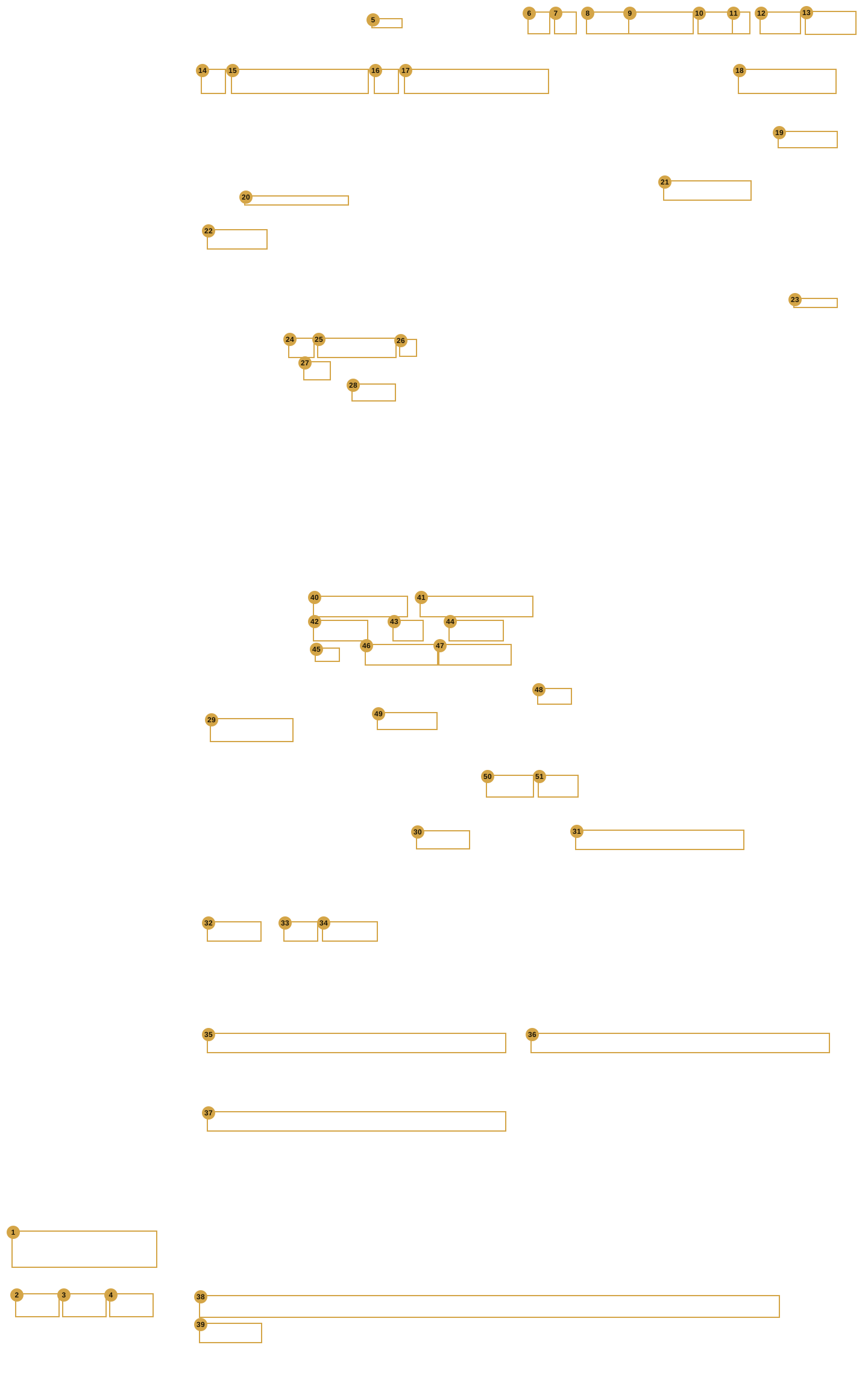
Each picture is a real capture of the Office test project, 1440 wide, 25 Oct 2026 (PINs, passwords and e-mails masked). Each control matched to a help entry has a gold box and a number; the number in the picture is the number in its table. Labels and layout boxes are not numbered.
To work through a room:
- Pick the room with ‹ / › or with Floor › Room ▾.
- Open a card with its fold arrow and fill it in.
- Press Save & Deploy on the Deploy step to send it to the house and the phones.
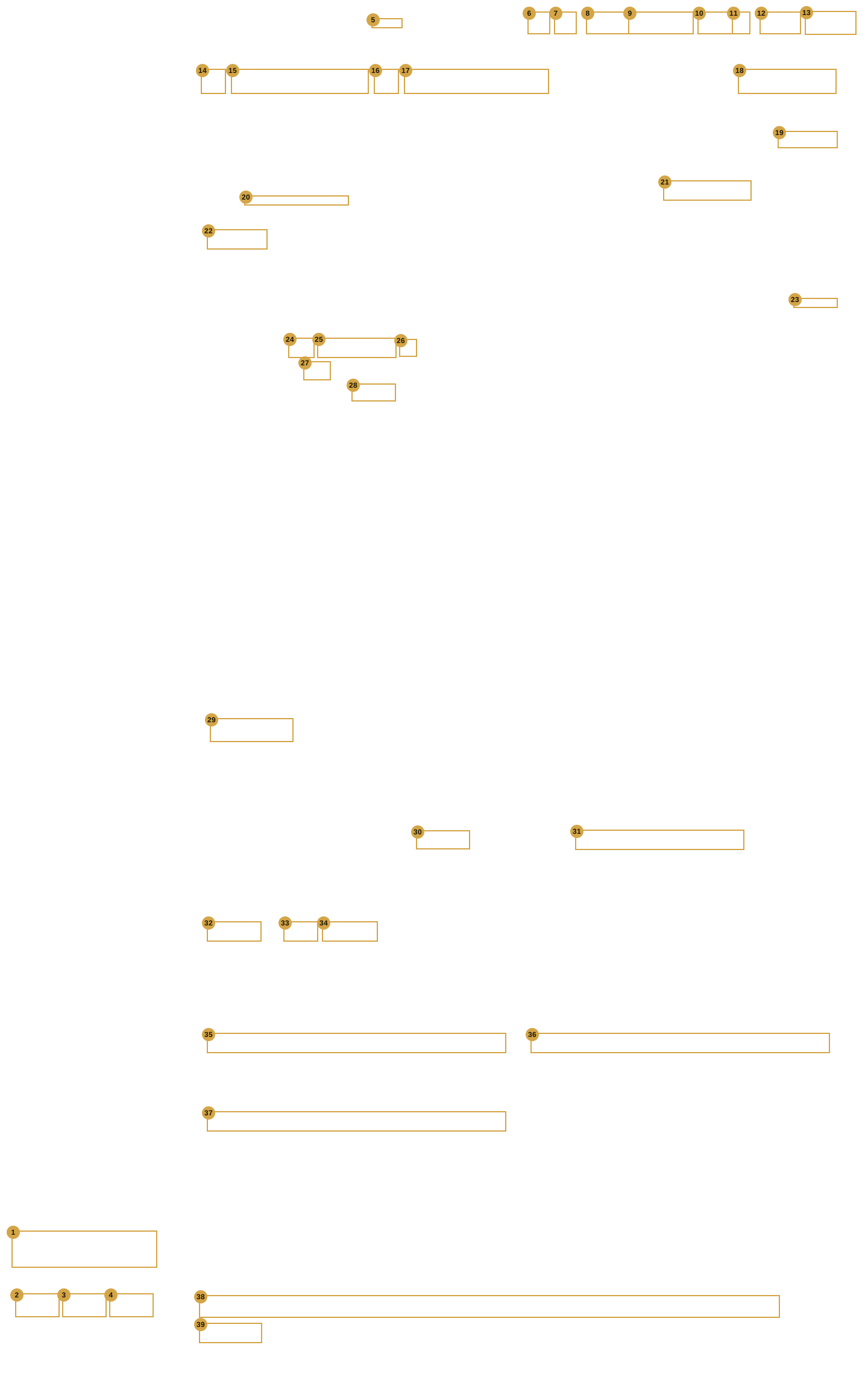
The screen as it opens (Reception)
| # | Screen | Help entry |
|---|---|---|
| 1 | Shell | ? Help |
| 2 | Shell | Export |
| 3 | Shell | Open |
| 4 | Shell | New |
| 5 | Shell | Switch… |
| 6 | Shell | Tree |
| 7 | Shell | Preview |
| 8 | Shell | Cancel |
| 9 | Shell | Cancel & exit |
| 10 | Shell | Save |
| 11 | Shell | ▾ (More save options) |
| 12 | Shell | ← Back |
| 13 | Shell | Next → |
| 14 | Room Devices | ‹ (previous room) · › (next room) |
| 15 | Room Devices | Floor › Room ▾ (room picker) |
| 16 | Room Devices | Room tile button |
| 17 | Rooms | Room name |
| 18 | Rooms | Reorder (bar button) |
| 19 | Room Devices | Generate names / Replace all… |
| 20 | Room Devices | Addresses / Joins line (show or hide) |
| 21 | Room Devices | Source (light) |
| 22 | Room Devices | + Add light / + Add curtain |
| 23 | Room Devices | + Add scene |
| 24 | Room Devices | Scene icon |
| 25 | Room Devices | Scene name |
| 26 | Room Devices | Remove scene (×) |
| 27 | Room Devices | Runs on (Hub · Crestron) |
| 28 | Room Devices | Press join (Crestron scene) |
| 29 | Room Devices | + Add a group |
| 30 | Room Devices | System |
| 31 | Room Devices | Gateway (Intesis AC) |
| 32 | Room Devices | + Add AC |
| 33 | Room Devices | Qty (ACs to add) |
| 34 | Room Devices | + Add fan |
| 35 | Room Devices | TV brand |
| 36 | Room Devices | Amplifier / soundbar |
| 37 | Room Devices | Projector (None / Projector) |
| 38 | Room Devices | Door phone row |
| 39 | Room Devices | + Add a door |
Break Out Area
Design Area
| # | Screen | Help entry |
|---|---|---|
| 1 | Shell | ? Help |
| 2 | Shell | Export |
| 3 | Shell | Open |
| 4 | Shell | New |
| 5 | Shell | Switch… |
| 6 | Shell | Tree |
| 7 | Shell | Preview |
| 8 | Shell | Cancel |
| 9 | Shell | Cancel & exit |
| 10 | Shell | Save |
| 11 | Shell | ▾ (More save options) |
| 12 | Shell | ← Back |
| 13 | Shell | Next → |
| 14 | Room Devices | ‹ (previous room) · › (next room) |
| 15 | Room Devices | Floor › Room ▾ (room picker) |
| 16 | Room Devices | Room tile button |
| 17 | Rooms | Room name |
| 18 | Rooms | Reorder (bar button) |
| 19 | Room Devices | Generate names / Replace all… |
| 20 | Room Devices | Addresses / Joins line (show or hide) |
| 21 | Room Devices | Source (light) |
| 22 | Room Devices | + Add light / + Add curtain |
| 23 | Room Devices | + Add scene |
| 24 | Room Devices | Scene icon |
| 25 | Room Devices | Scene name |
| 26 | Room Devices | Remove scene (×) |
| 27 | Room Devices | Runs on (Hub · Crestron) |
| 28 | Room Devices | Press join (Crestron scene) |
| 29 | Room Devices | Type (Main · Sheer · Blind) |
| 30 | Room Devices | Keep as group |
| 31 | Room Devices | Keep as individual |
| 32 | Room Devices | Gap between curtains |
| 33 | Room Devices | + Add a group |
| 34 | Room Devices | System |
| 35 | Room Devices | Gateway (Intesis AC) |
| 36 | Room Devices | + Add AC |
| 37 | Room Devices | Qty (ACs to add) |
| 38 | Room Devices | + Add fan |
| 39 | Room Devices | TV brand |
| 40 | Room Devices | Amplifier / soundbar |
| 41 | Room Devices | Projector (None / Projector) |
| 42 | Room Devices | Door phone row |
| 43 | Room Devices | + Add a door |
The AC IR codes box
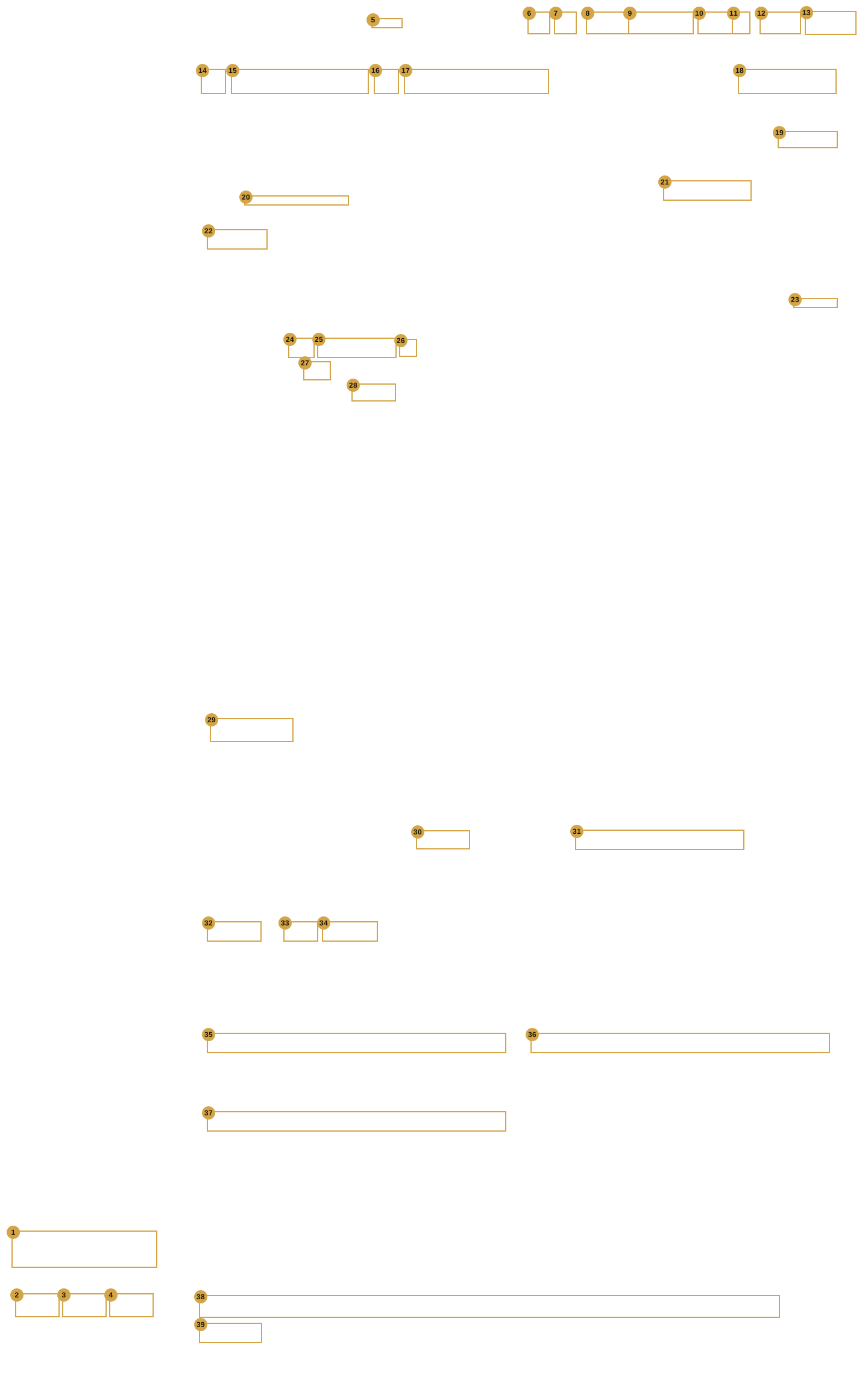
| # | Screen | Help entry |
|---|---|---|
| 1 | Shell | ? Help |
| 2 | Shell | Export |
| 3 | Shell | Open |
| 4 | Shell | New |
| 5 | Shell | Switch… |
| 6 | Shell | Tree |
| 7 | Shell | Preview |
| 8 | Shell | Cancel |
| 9 | Shell | Cancel & exit |
| 10 | Shell | Save |
| 11 | Shell | ▾ (More save options) |
| 12 | Shell | ← Back |
| 13 | Shell | Next → |
| 14 | Room Devices | ‹ (previous room) · › (next room) |
| 15 | Room Devices | Floor › Room ▾ (room picker) |
| 16 | Room Devices | Room tile button |
| 17 | Rooms | Room name |
| 18 | Rooms | Reorder (bar button) |
| 19 | Room Devices | Generate names / Replace all… |
| 20 | Room Devices | Addresses / Joins line (show or hide) |
| 21 | Room Devices | Source (light) |
| 22 | Room Devices | + Add light / + Add curtain |
| 23 | Room Devices | + Add scene |
| 24 | Room Devices | Scene icon |
| 25 | Room Devices | Scene name |
| 26 | Room Devices | Remove scene (×) |
| 27 | Room Devices | Runs on (Hub · Crestron) |
| 28 | Room Devices | Press join (Crestron scene) |
| 29 | Room Devices | + Add a group |
| 30 | Room Devices | System |
| 31 | Room Devices | Gateway (Intesis AC) |
| 32 | Room Devices | + Add AC |
| 33 | Room Devices | Qty (ACs to add) |
| 34 | Room Devices | + Add fan |
| 35 | Room Devices | TV brand |
| 36 | Room Devices | Amplifier / soundbar |
| 37 | Room Devices | Projector (None / Projector) |
| 38 | Room Devices | Door phone row |
| 39 | Room Devices | + Add a door |
The Choose icon box
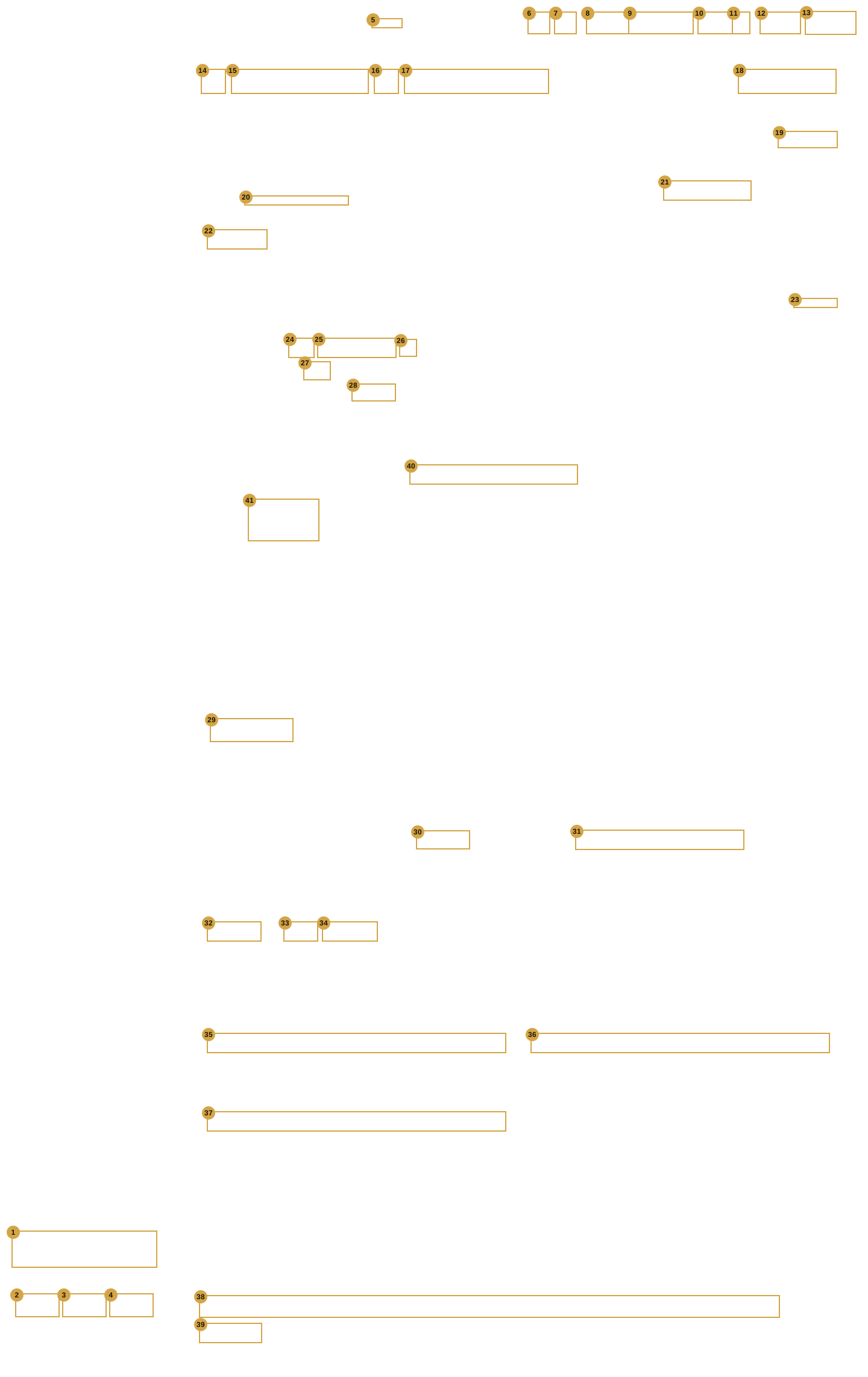
| # | Screen | Help entry |
|---|---|---|
| 1 | Shell | ? Help |
| 2 | Shell | Export |
| 3 | Shell | Open |
| 4 | Shell | New |
| 5 | Shell | Switch… |
| 6 | Shell | Tree |
| 7 | Shell | Preview |
| 8 | Shell | Cancel |
| 9 | Shell | Cancel & exit |
| 10 | Shell | Save |
| 11 | Shell | ▾ (More save options) |
| 12 | Shell | ← Back |
| 13 | Shell | Next → |
| 14 | Room Devices | ‹ (previous room) · › (next room) |
| 15 | Room Devices | Floor › Room ▾ (room picker) |
| 16 | Room Devices | Room tile button |
| 17 | Rooms | Room name |
| 18 | Rooms | Reorder (bar button) |
| 19 | Room Devices | Generate names / Replace all… |
| 20 | Room Devices | Addresses / Joins line (show or hide) |
| 21 | Room Devices | Source (light) |
| 22 | Room Devices | + Add light / + Add curtain |
| 23 | Room Devices | + Add scene |
| 24 | Room Devices | Scene icon |
| 25 | Room Devices | Scene name |
| 26 | Room Devices | Remove scene (×) |
| 27 | Room Devices | Runs on (Hub · Crestron) |
| 28 | Room Devices | Press join (Crestron scene) |
| 29 | Room Devices | + Add a group |
| 30 | Room Devices | System |
| 31 | Room Devices | Gateway (Intesis AC) |
| 32 | Room Devices | + Add AC |
| 33 | Room Devices | Qty (ACs to add) |
| 34 | Room Devices | + Add fan |
| 35 | Room Devices | TV brand |
| 36 | Room Devices | Amplifier / soundbar |
| 37 | Room Devices | Projector (None / Projector) |
| 38 | Room Devices | Door phone row |
| 39 | Room Devices | + Add a door |
| 40 | Room Devices | Search (Choose an icon) |
| 41 | Room Devices | Icon (in Choose an icon) |
The Connect TV box (stand-in)
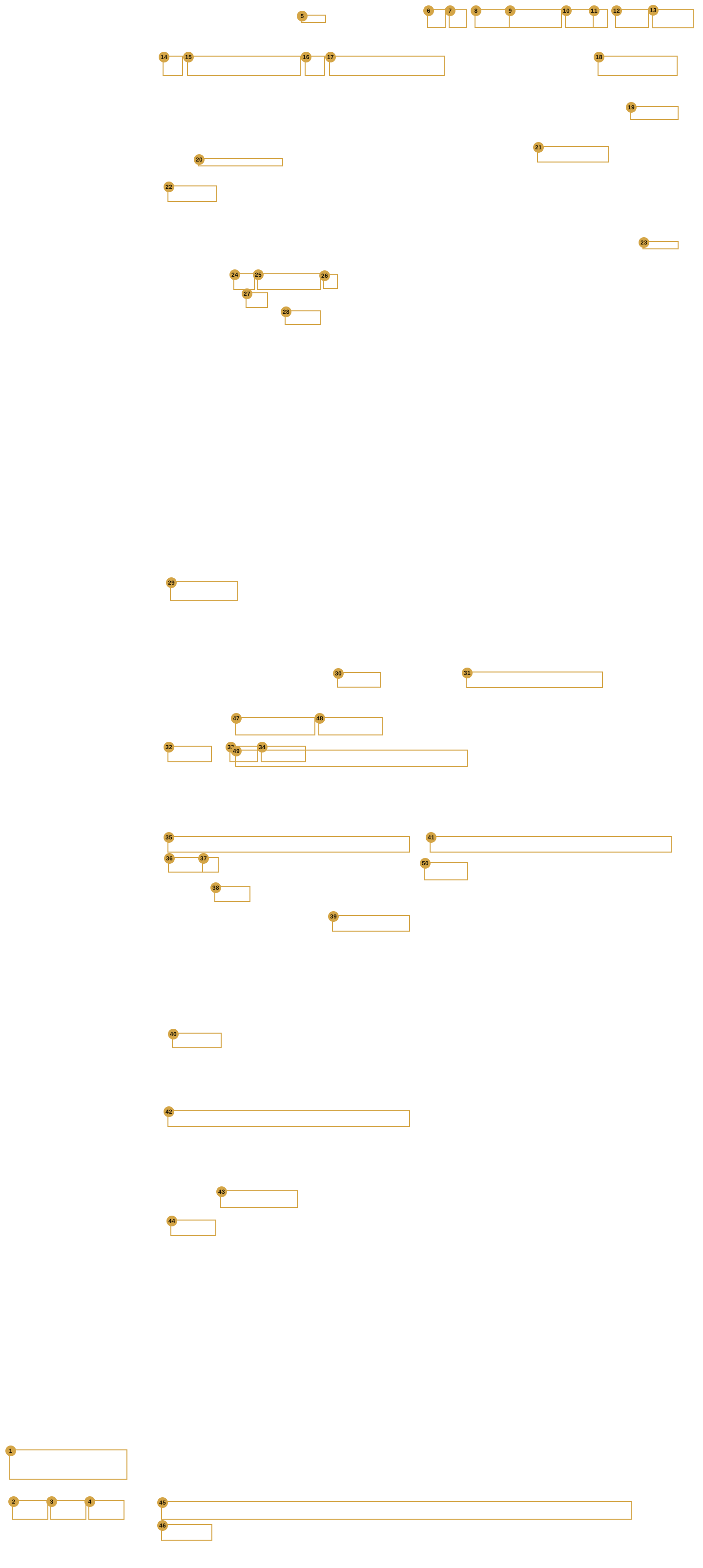
The door phone box
| # | Screen | Help entry |
|---|---|---|
| 1 | Shell | ? Help |
| 2 | Shell | Export |
| 3 | Shell | Open |
| 4 | Shell | New |
| 5 | Shell | Switch… |
| 6 | Shell | Tree |
| 7 | Shell | Preview |
| 8 | Shell | Cancel |
| 9 | Shell | Cancel & exit |
| 10 | Shell | Save |
| 11 | Shell | ▾ (More save options) |
| 12 | Shell | ← Back |
| 13 | Shell | Next → |
| 14 | Room Devices | ‹ (previous room) · › (next room) |
| 15 | Room Devices | Floor › Room ▾ (room picker) |
| 16 | Room Devices | Room tile button |
| 17 | Rooms | Room name |
| 18 | Rooms | Reorder (bar button) |
| 19 | Room Devices | Generate names / Replace all… |
| 20 | Room Devices | Addresses / Joins line (show or hide) |
| 21 | Room Devices | Source (light) |
| 22 | Room Devices | + Add light / + Add curtain |
| 23 | Room Devices | + Add scene |
| 24 | Room Devices | Scene icon |
| 25 | Room Devices | Scene name |
| 26 | Room Devices | Remove scene (×) |
| 27 | Room Devices | Runs on (Hub · Crestron) |
| 28 | Room Devices | Press join (Crestron scene) |
| 29 | Room Devices | + Add a group |
| 30 | Room Devices | System |
| 31 | Room Devices | Gateway (Intesis AC) |
| 32 | Room Devices | + Add AC |
| 33 | Room Devices | Qty (ACs to add) |
| 34 | Room Devices | + Add fan |
| 35 | Room Devices | TV brand |
| 36 | Room Devices | Amplifier / soundbar |
| 37 | Room Devices | Projector (None / Projector) |
| 38 | Room Devices | Door phone row |
| 39 | Room Devices | + Add a door |
| 40 | Room Devices | Door name |
| 41 | Room Devices | Door phone IP |
| 42 | Room Devices | Brand |
| 43 | Room Devices | Relay |
| 44 | Room Devices | Word (door or gate) |
| 45 | Room Devices | HTTPS |
| 46 | Room Devices | Login user |
| 47 | Room Devices | Login password |
| 48 | Room Devices | Copy (bell address) |
| 49 | Room Devices | Record now |
| 50 | Room Devices | Cancel (door phone box) |
| 51 | Room Devices | Done (door phone box) |
The Global Caché unit box
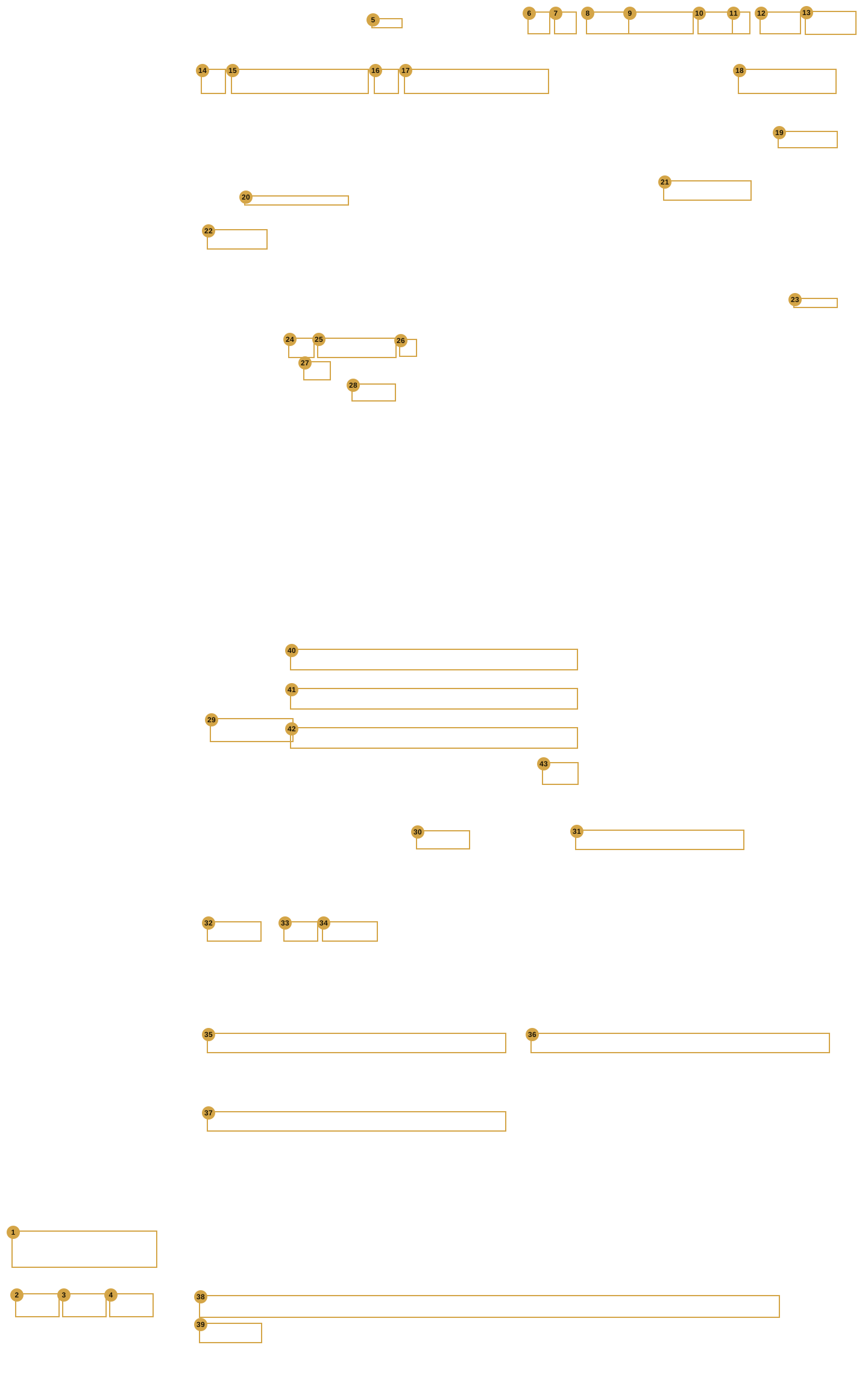
The Help panel
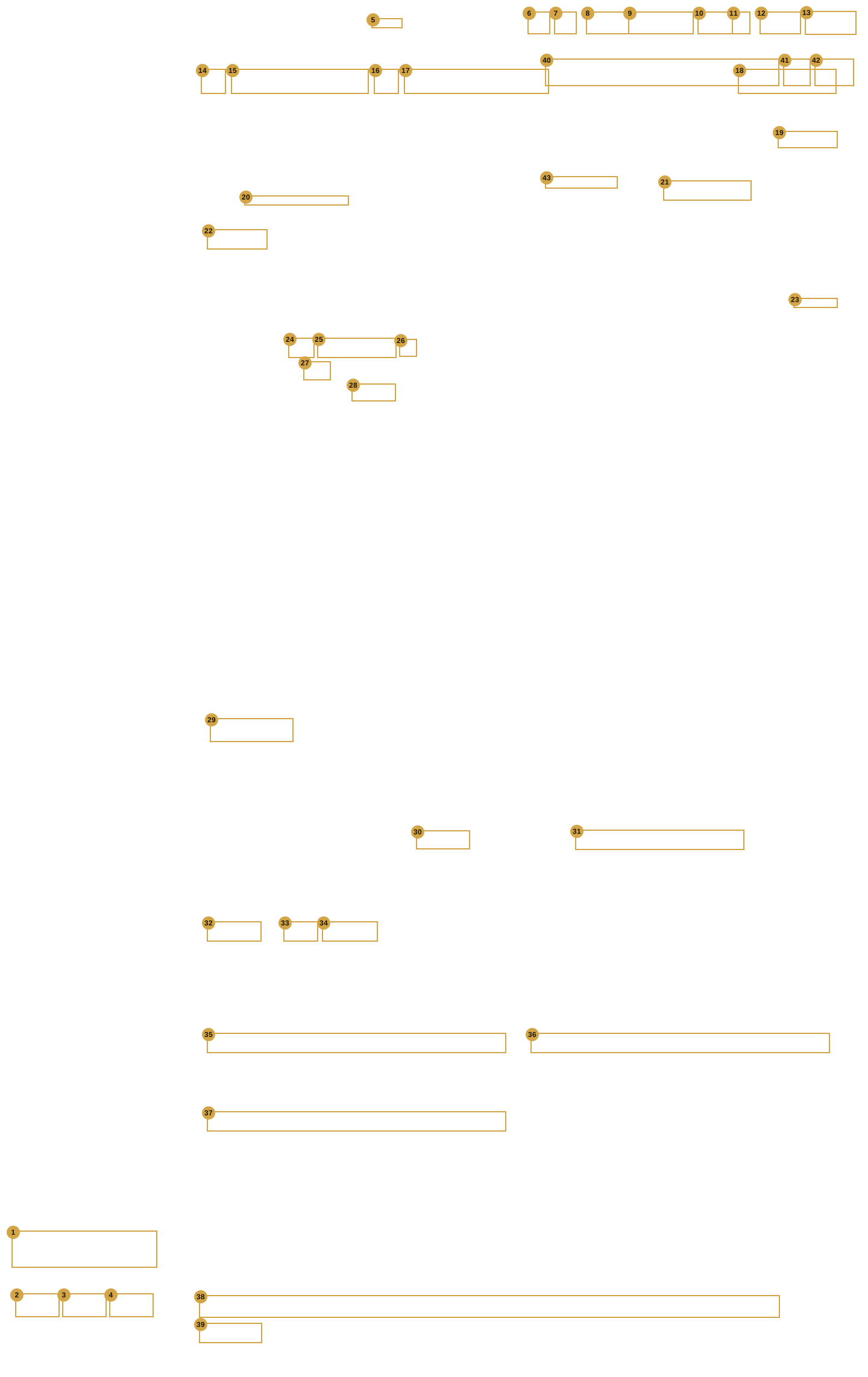
| # | Screen | Help entry |
|---|---|---|
| 1 | Shell | ? Help |
| 2 | Shell | Export |
| 3 | Shell | Open |
| 4 | Shell | New |
| 5 | Shell | Switch… |
| 6 | Shell | Tree |
| 7 | Shell | Preview |
| 8 | Shell | Cancel |
| 9 | Shell | Cancel & exit |
| 10 | Shell | Save |
| 11 | Shell | ▾ (More save options) |
| 12 | Shell | ← Back |
| 13 | Shell | Next → |
| 14 | Room Devices | ‹ (previous room) · › (next room) |
| 15 | Room Devices | Floor › Room ▾ (room picker) |
| 16 | Room Devices | Room tile button |
| 17 | Rooms | Room name |
| 18 | Rooms | Reorder (bar button) |
| 19 | Room Devices | Generate names / Replace all… |
| 20 | Room Devices | Addresses / Joins line (show or hide) |
| 21 | Room Devices | Source (light) |
| 22 | Room Devices | + Add light / + Add curtain |
| 23 | Room Devices | + Add scene |
| 24 | Room Devices | Scene icon |
| 25 | Room Devices | Scene name |
| 26 | Room Devices | Remove scene (×) |
| 27 | Room Devices | Runs on (Hub · Crestron) |
| 28 | Room Devices | Press join (Crestron scene) |
| 29 | Room Devices | + Add a group |
| 30 | Room Devices | System |
| 31 | Room Devices | Gateway (Intesis AC) |
| 32 | Room Devices | + Add AC |
| 33 | Room Devices | Qty (ACs to add) |
| 34 | Room Devices | + Add fan |
| 35 | Room Devices | TV brand |
| 36 | Room Devices | Amplifier / soundbar |
| 37 | Room Devices | Projector (None / Projector) |
| 38 | Room Devices | Door phone row |
| 39 | Room Devices | + Add a door |
| 40 | Room Devices | Ask a question |
| 41 | Room Devices | Ask by voice |
| 42 | Room Devices | Ask |
| 43 | Room Devices | Open full help → |
The Pair Apple TV box (stand-in)
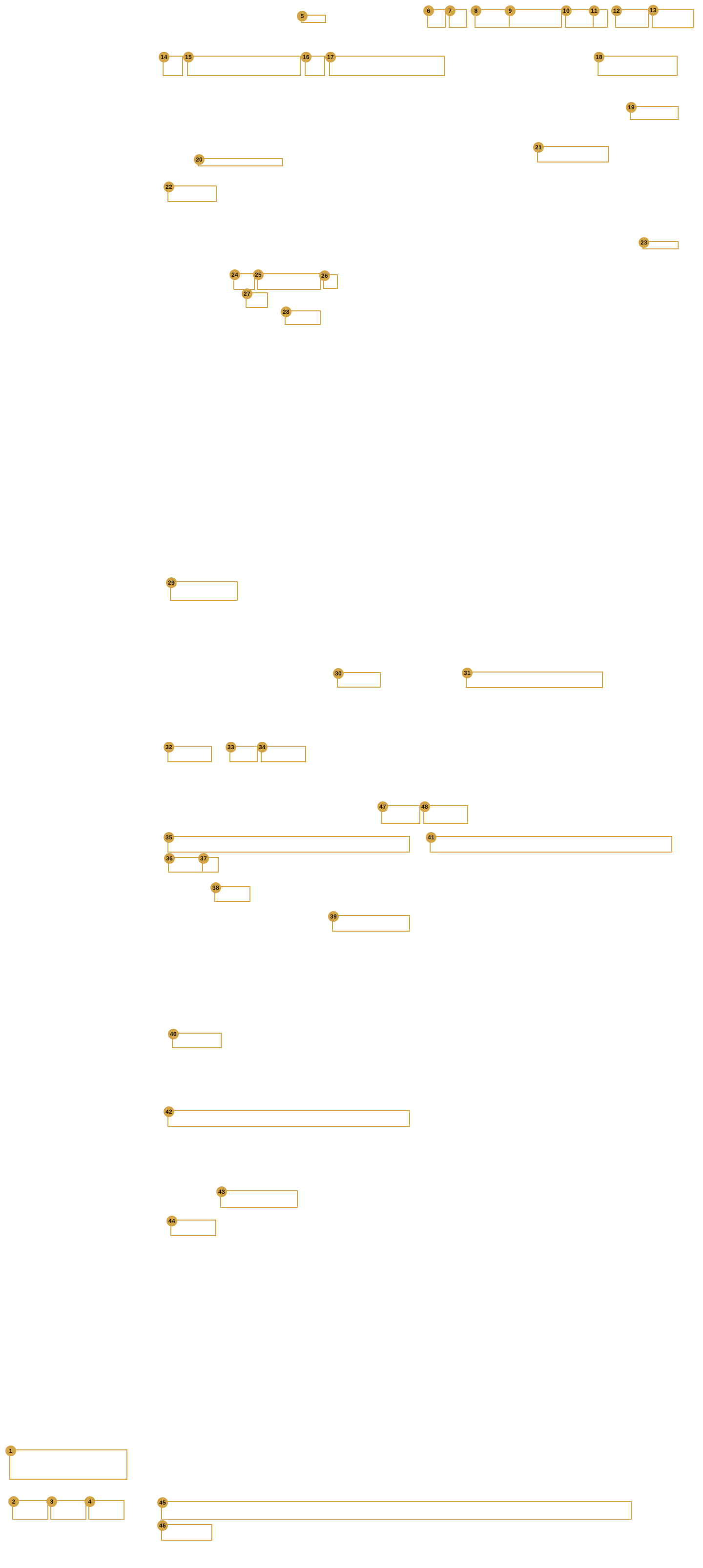
The Pick the speaker box
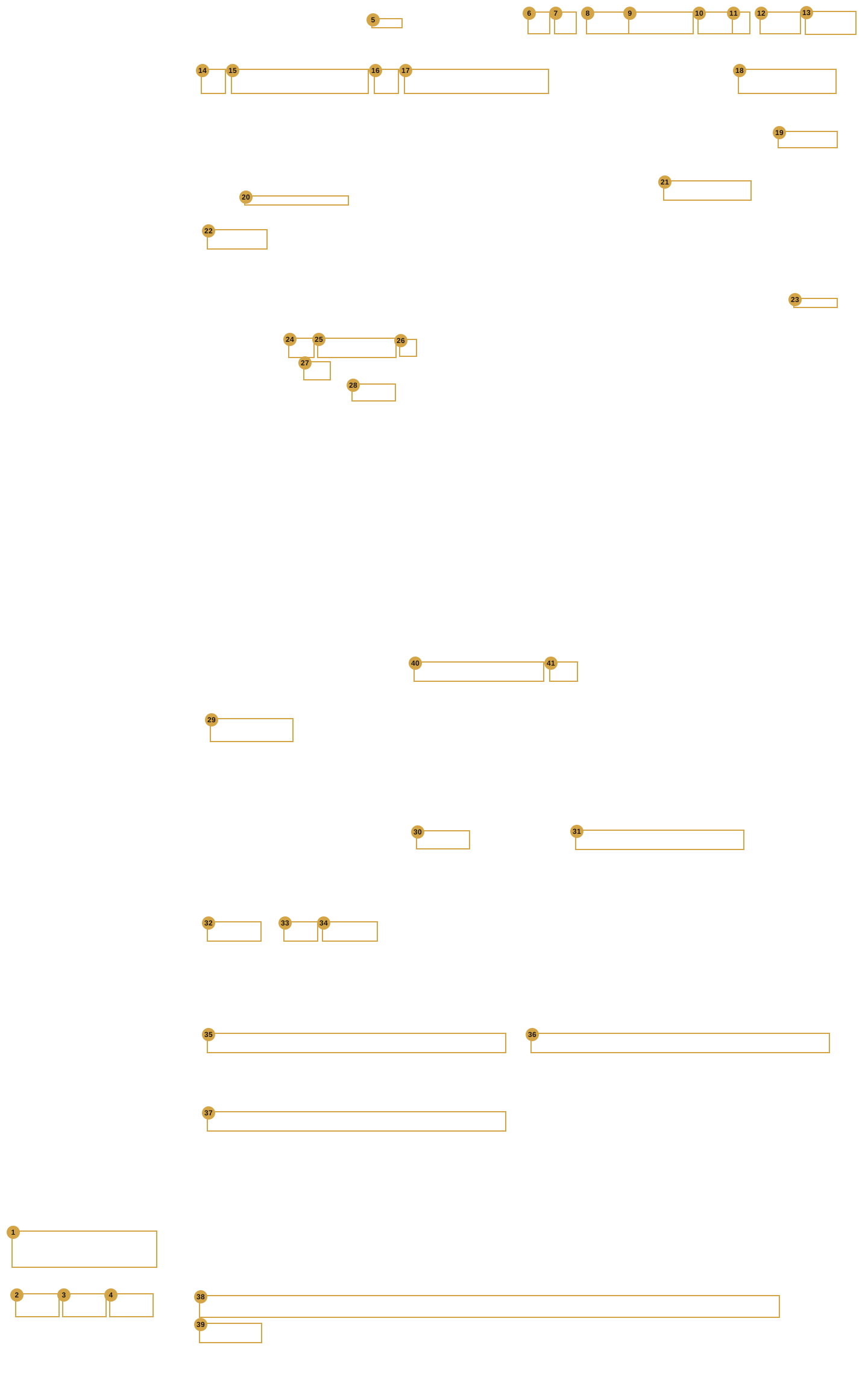
| # | Screen | Help entry |
|---|---|---|
| 1 | Shell | ? Help |
| 2 | Shell | Export |
| 3 | Shell | Open |
| 4 | Shell | New |
| 5 | Shell | Switch… |
| 6 | Shell | Tree |
| 7 | Shell | Preview |
| 8 | Shell | Cancel |
| 9 | Shell | Cancel & exit |
| 10 | Shell | Save |
| 11 | Shell | ▾ (More save options) |
| 12 | Shell | ← Back |
| 13 | Shell | Next → |
| 14 | Room Devices | ‹ (previous room) · › (next room) |
| 15 | Room Devices | Floor › Room ▾ (room picker) |
| 16 | Room Devices | Room tile button |
| 17 | Rooms | Room name |
| 18 | Rooms | Reorder (bar button) |
| 19 | Room Devices | Generate names / Replace all… |
| 20 | Room Devices | Addresses / Joins line (show or hide) |
| 21 | Room Devices | Source (light) |
| 22 | Room Devices | + Add light / + Add curtain |
| 23 | Room Devices | + Add scene |
| 24 | Room Devices | Scene icon |
| 25 | Room Devices | Scene name |
| 26 | Room Devices | Remove scene (×) |
| 27 | Room Devices | Runs on (Hub · Crestron) |
| 28 | Room Devices | Press join (Crestron scene) |
| 29 | Room Devices | + Add a group |
| 30 | Room Devices | System |
| 31 | Room Devices | Gateway (Intesis AC) |
| 32 | Room Devices | + Add AC |
| 33 | Room Devices | Qty (ACs to add) |
| 34 | Room Devices | + Add fan |
| 35 | Room Devices | TV brand |
| 36 | Room Devices | Amplifier / soundbar |
| 37 | Room Devices | Projector (None / Projector) |
| 38 | Room Devices | Door phone row |
| 39 | Room Devices | + Add a door |
| 40 | Project & Bridge | Speaker id (RINCON_…) |
| 41 | Project & Bridge | Use (speaker id) |
The press Allow on the TV box (stand-in)
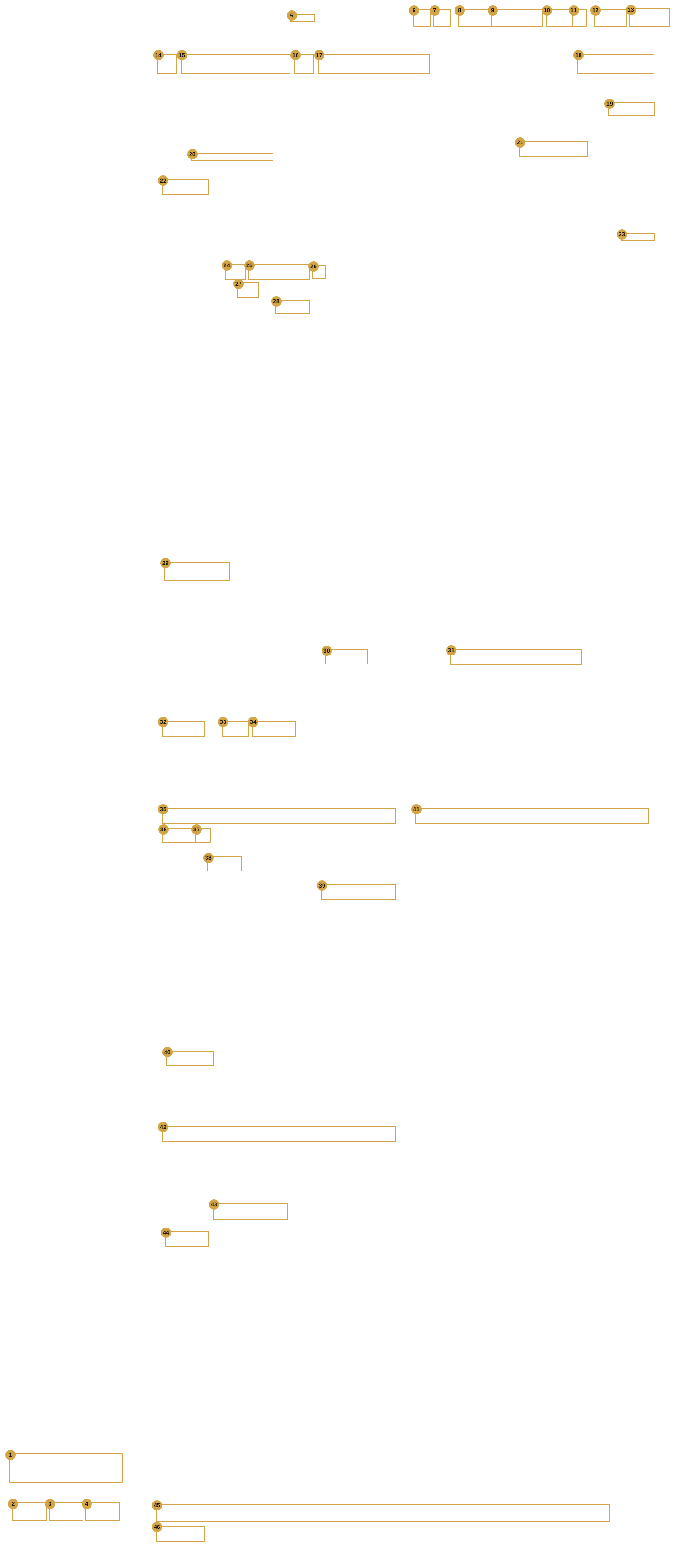
The room picker open
| # | Screen | Help entry |
|---|---|---|
| 1 | Shell | ? Help |
| 2 | Shell | Export |
| 3 | Shell | Open |
| 4 | Shell | New |
| 5 | Shell | Switch… |
| 6 | Shell | Tree |
| 7 | Shell | Preview |
| 8 | Shell | Cancel |
| 9 | Shell | Cancel & exit |
| 10 | Shell | Save |
| 11 | Shell | ▾ (More save options) |
| 12 | Shell | ← Back |
| 13 | Shell | Next → |
| 14 | Room Devices | ‹ (previous room) · › (next room) |
| 15 | Room Devices | Floor › Room ▾ (room picker) |
| 16 | Room Devices | Room tile button |
| 17 | Rooms | Room name |
| 18 | Rooms | Reorder (bar button) |
| 19 | Room Devices | Room in the picker list |
| 20 | Room Devices | Generate names / Replace all… |
| 21 | Room Devices | Addresses / Joins line (show or hide) |
| 22 | Room Devices | Source (light) |
| 23 | Room Devices | + Add light / + Add curtain |
| 24 | Room Devices | + Add scene |
| 25 | Room Devices | Scene icon |
| 26 | Room Devices | Scene name |
| 27 | Room Devices | Remove scene (×) |
| 28 | Room Devices | Runs on (Hub · Crestron) |
| 29 | Room Devices | Press join (Crestron scene) |
| 30 | Room Devices | + Add a group |
| 31 | Room Devices | System |
| 32 | Room Devices | Gateway (Intesis AC) |
| 33 | Room Devices | + Add AC |
| 34 | Room Devices | Qty (ACs to add) |
| 35 | Room Devices | + Add fan |
| 36 | Room Devices | TV brand |
| 37 | Room Devices | Amplifier / soundbar |
| 38 | Room Devices | Projector (None / Projector) |
| 39 | Room Devices | Door phone row |
| 40 | Room Devices | + Add a door |
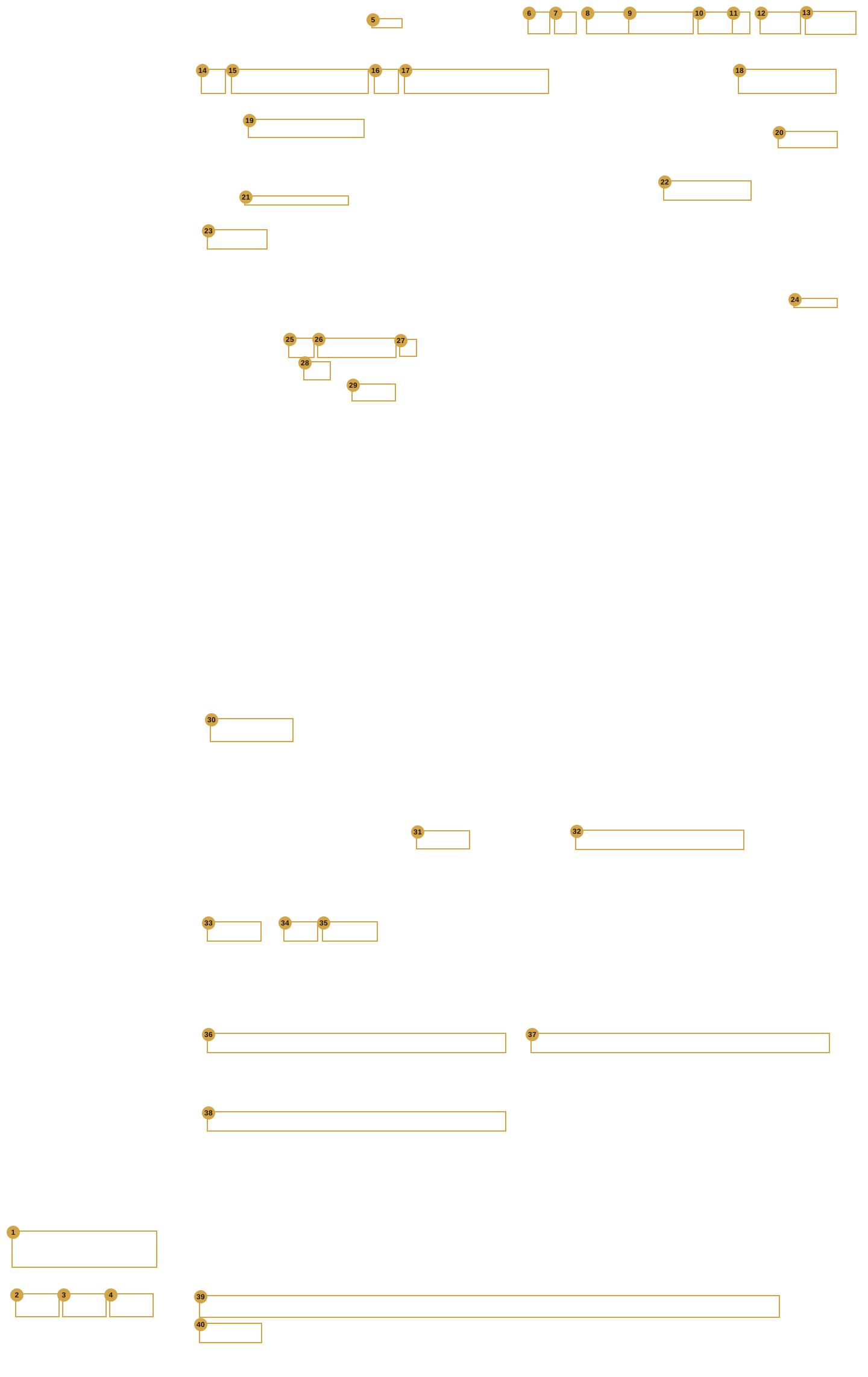
HR Cabin
| # | Screen | Help entry |
|---|---|---|
| 1 | Shell | ? Help |
| 2 | Shell | Export |
| 3 | Shell | Open |
| 4 | Shell | New |
| 5 | Shell | Switch… |
| 6 | Shell | Tree |
| 7 | Shell | Preview |
| 8 | Shell | Cancel |
| 9 | Shell | Cancel & exit |
| 10 | Shell | Save |
| 11 | Shell | ▾ (More save options) |
| 12 | Shell | ← Back |
| 13 | Shell | Next → |
| 14 | Room Devices | ‹ (previous room) · › (next room) |
| 15 | Room Devices | Floor › Room ▾ (room picker) |
| 16 | Room Devices | Room tile button |
| 17 | Rooms | Room name |
| 18 | Rooms | Reorder (bar button) |
| 19 | Room Devices | Generate names / Replace all… |
| 20 | Room Devices | Addresses / Joins line (show or hide) |
| 21 | Room Devices | Source (light) |
| 22 | Room Devices | + Add light / + Add curtain |
| 23 | Room Devices | + Add scene |
| 24 | Room Devices | Scene icon |
| 25 | Room Devices | Scene name |
| 26 | Room Devices | Remove scene (×) |
| 27 | Room Devices | Runs on (Hub · Crestron) |
| 28 | Room Devices | Press join (Crestron scene) |
| 29 | Room Devices | + Add a group |
| 30 | Room Devices | System |
| 31 | Room Devices | Gateway (Intesis AC) |
| 32 | Room Devices | + Add AC |
| 33 | Room Devices | Qty (ACs to add) |
| 34 | Room Devices | + Add fan |
| 35 | Room Devices | TV brand |
| 36 | Room Devices | Amplifier / soundbar |
| 37 | Room Devices | Projector (None / Projector) |
| 38 | Room Devices | Door phone row |
| 39 | Room Devices | + Add a door |
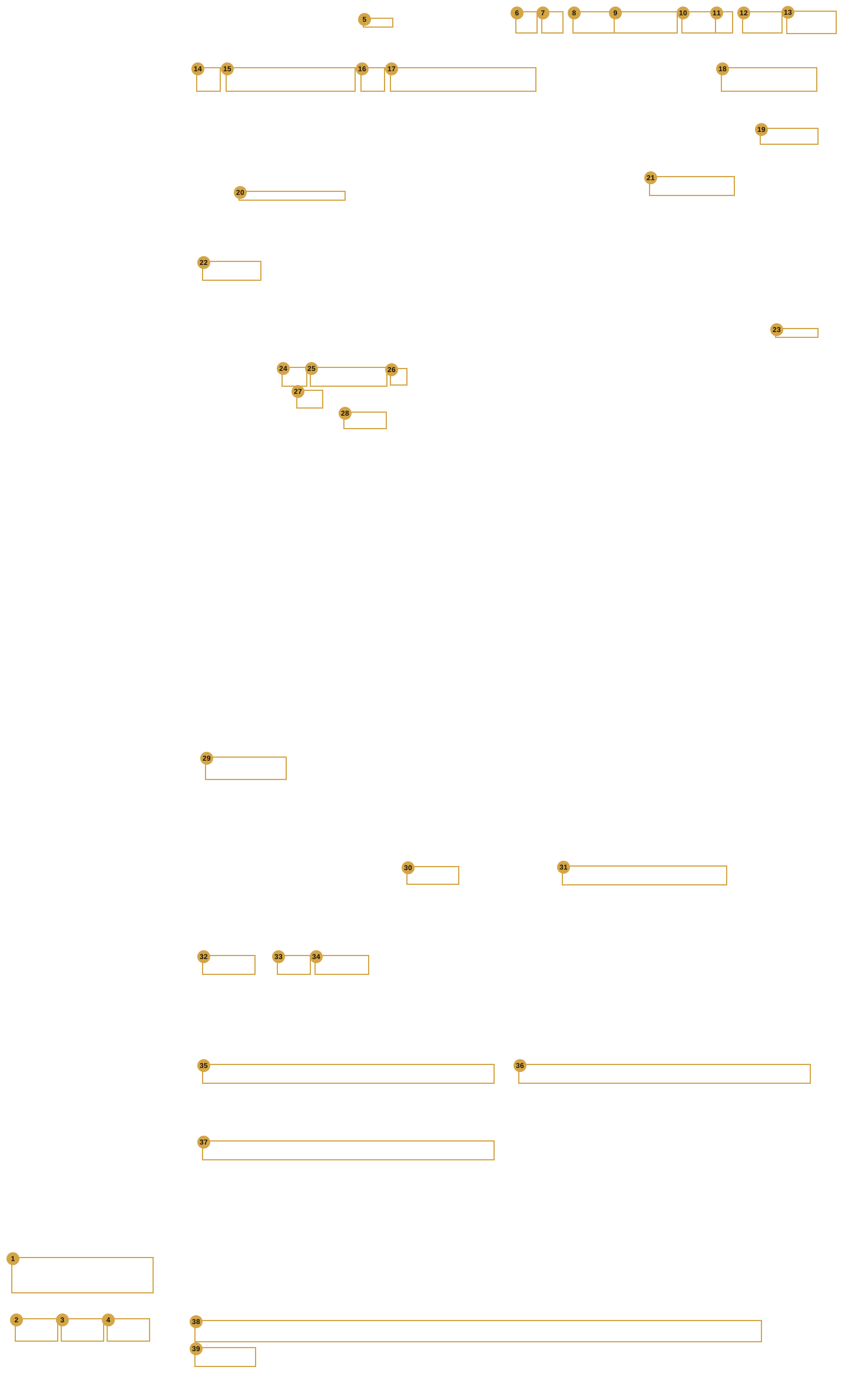
Programmer Cabin
Reception
| # | Screen | Help entry |
|---|---|---|
| 1 | Shell | ? Help |
| 2 | Shell | Export |
| 3 | Shell | Open |
| 4 | Shell | New |
| 5 | Shell | Switch… |
| 6 | Shell | Tree |
| 7 | Shell | Preview |
| 8 | Shell | Cancel |
| 9 | Shell | Cancel & exit |
| 10 | Shell | Save |
| 11 | Shell | ▾ (More save options) |
| 12 | Shell | ← Back |
| 13 | Shell | Next → |
| 14 | Room Devices | ‹ (previous room) · › (next room) |
| 15 | Room Devices | Floor › Room ▾ (room picker) |
| 16 | Room Devices | Room tile button |
| 17 | Rooms | Room name |
| 18 | Rooms | Reorder (bar button) |
| 19 | Room Devices | Generate names / Replace all… |
| 20 | Room Devices | Addresses / Joins line (show or hide) |
| 21 | Room Devices | Source (light) |
| 22 | Room Devices | + Add light / + Add curtain |
| 23 | Room Devices | + Add scene |
| 24 | Room Devices | Scene icon |
| 25 | Room Devices | Scene name |
| 26 | Room Devices | Remove scene (×) |
| 27 | Room Devices | Runs on (Hub · Crestron) |
| 28 | Room Devices | Press join (Crestron scene) |
| 29 | Room Devices | + Add a group |
| 30 | Room Devices | System |
| 31 | Room Devices | Gateway (Intesis AC) |
| 32 | Room Devices | + Add AC |
| 33 | Room Devices | Qty (ACs to add) |
| 34 | Room Devices | + Add fan |
| 35 | Room Devices | TV brand |
| 36 | Room Devices | Amplifier / soundbar |
| 37 | Room Devices | Projector (None / Projector) |
| 38 | Room Devices | Door phone row |
| 39 | Room Devices | + Add a door |
Reorder devices turned on
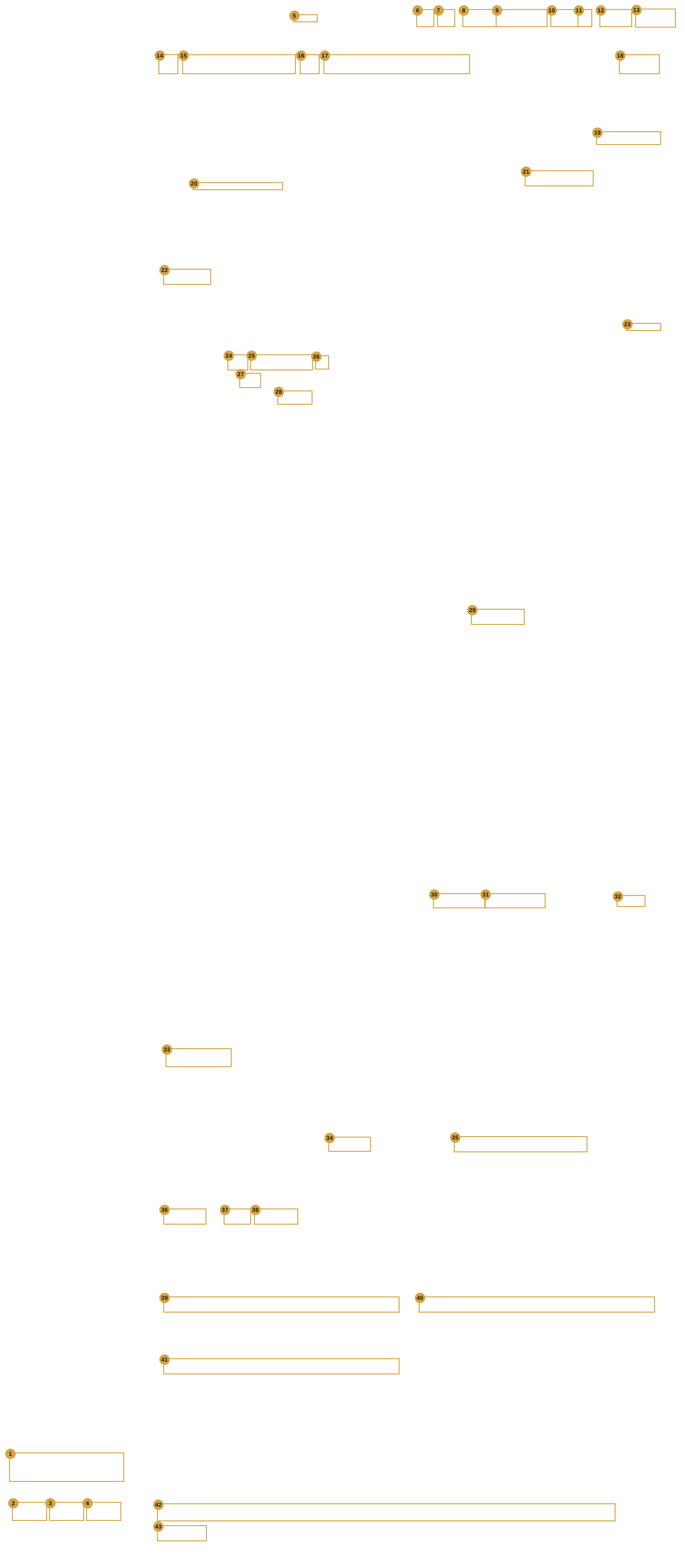
| # | Screen | Help entry |
|---|---|---|
| 1 | Shell | ? Help |
| 2 | Shell | Export |
| 3 | Shell | Open |
| 4 | Shell | New |
| 5 | Shell | Switch… |
| 6 | Shell | Tree |
| 7 | Shell | Preview |
| 8 | Shell | Cancel |
| 9 | Shell | Cancel & exit |
| 10 | Shell | Save |
| 11 | Shell | ▾ (More save options) |
| 12 | Shell | ← Back |
| 13 | Shell | Next → |
| 14 | Room Devices | ‹ (previous room) · › (next room) |
| 15 | Room Devices | Floor › Room ▾ (room picker) |
| 16 | Room Devices | Room tile button |
| 17 | Rooms | Room name |
| 18 | Rooms | Reorder (bar button) |
| 19 | Room Devices | Generate names / Replace all… |
| 20 | Room Devices | Addresses / Joins line (show or hide) |
| 21 | Room Devices | Source (light) |
| 22 | Room Devices | + Add light / + Add curtain |
| 23 | Room Devices | + Add scene |
| 24 | Room Devices | Scene icon |
| 25 | Room Devices | Scene name |
| 26 | Room Devices | Remove scene (×) |
| 27 | Room Devices | Runs on (Hub · Crestron) |
| 28 | Room Devices | Press join (Crestron scene) |
| 29 | Room Devices | Type (Main · Sheer · Blind) |
| 30 | Room Devices | Keep as group |
| 31 | Room Devices | Keep as individual |
| 32 | Room Devices | Gap between curtains |
| 33 | Room Devices | + Add a group |
| 34 | Room Devices | System |
| 35 | Room Devices | Gateway (Intesis AC) |
| 36 | Room Devices | + Add AC |
| 37 | Room Devices | Qty (ACs to add) |
| 38 | Room Devices | + Add fan |
| 39 | Room Devices | TV brand |
| 40 | Room Devices | Amplifier / soundbar |
| 41 | Room Devices | Projector (None / Projector) |
| 42 | Room Devices | Door phone row |
| 43 | Room Devices | + Add a door |
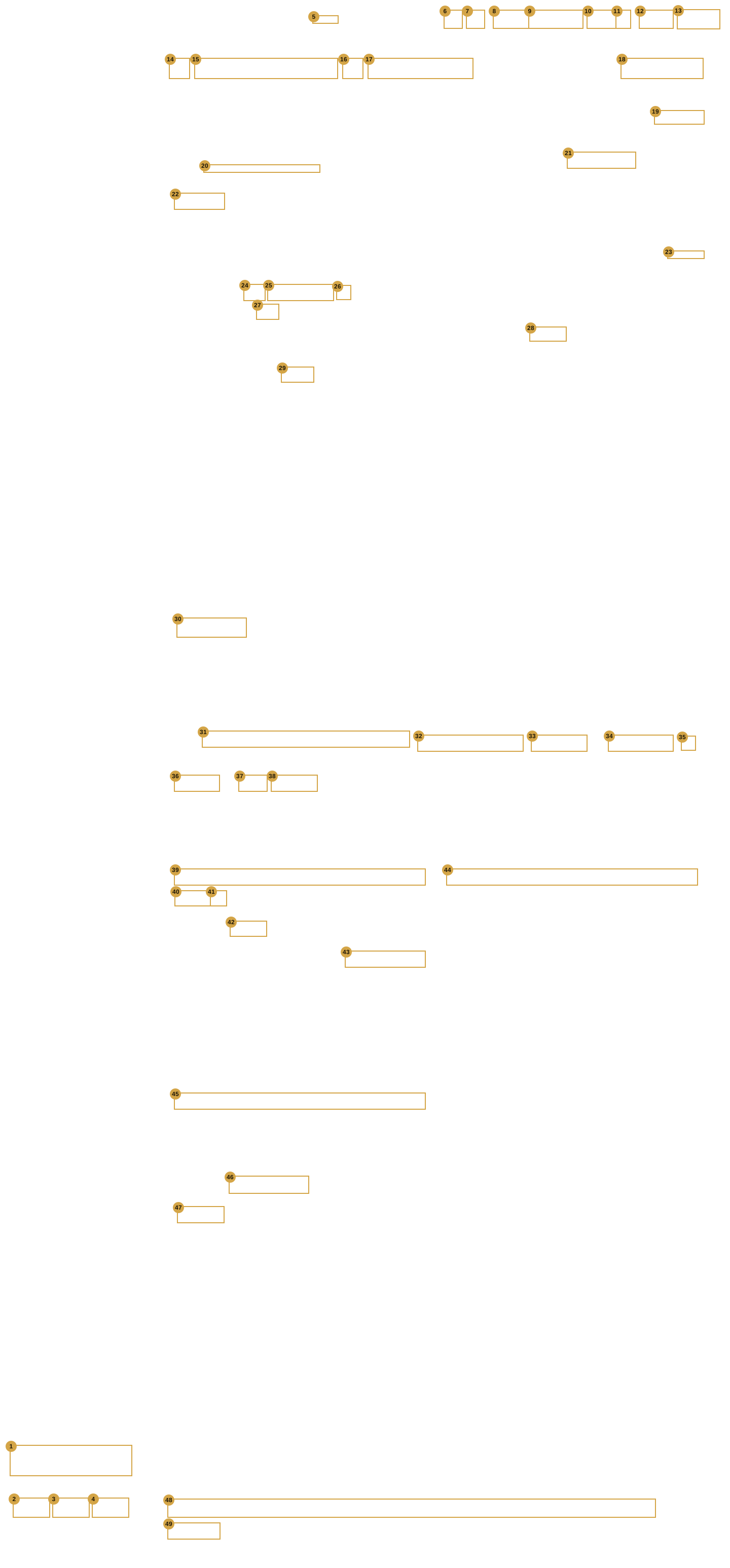
The Room Tile card open
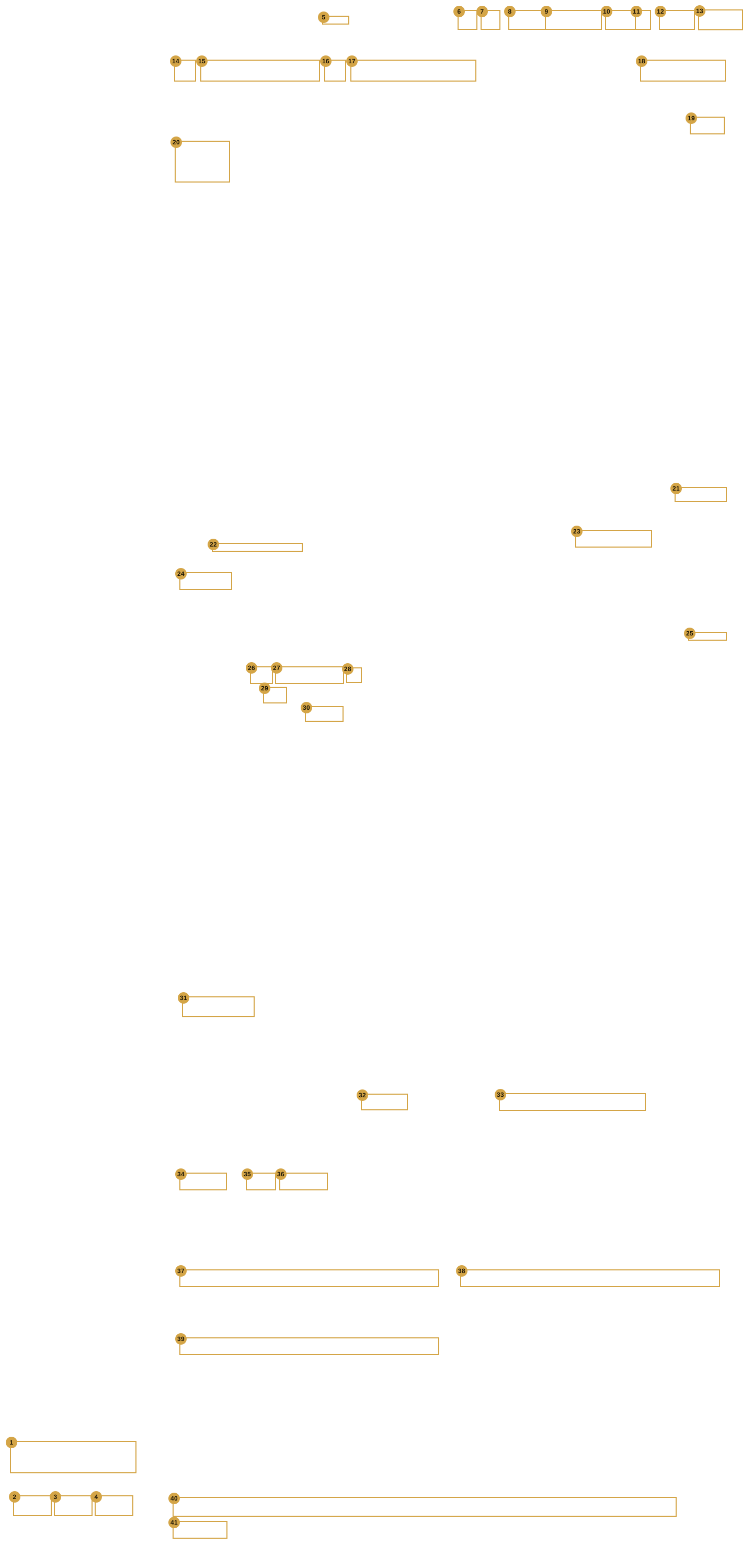
| # | Screen | Help entry |
|---|---|---|
| 1 | Shell | ? Help |
| 2 | Shell | Export |
| 3 | Shell | Open |
| 4 | Shell | New |
| 5 | Shell | Switch… |
| 6 | Shell | Tree |
| 7 | Shell | Preview |
| 8 | Shell | Cancel |
| 9 | Shell | Cancel & exit |
| 10 | Shell | Save |
| 11 | Shell | ▾ (More save options) |
| 12 | Shell | ← Back |
| 13 | Shell | Next → |
| 14 | Room Devices | ‹ (previous room) · › (next room) |
| 15 | Room Devices | Floor › Room ▾ (room picker) |
| 16 | Room Devices | Room tile button |
| 17 | Rooms | Room name |
| 18 | Rooms | Reorder (bar button) |
| 19 | Room Devices | Done (Room Tile) |
| 20 | Room Devices | Room tile picture |
| 21 | Room Devices | Generate names / Replace all… |
| 22 | Room Devices | Addresses / Joins line (show or hide) |
| 23 | Room Devices | Source (light) |
| 24 | Room Devices | + Add light / + Add curtain |
| 25 | Room Devices | + Add scene |
| 26 | Room Devices | Scene icon |
| 27 | Room Devices | Scene name |
| 28 | Room Devices | Remove scene (×) |
| 29 | Room Devices | Runs on (Hub · Crestron) |
| 30 | Room Devices | Press join (Crestron scene) |
| 31 | Room Devices | + Add a group |
| 32 | Room Devices | System |
| 33 | Room Devices | Gateway (Intesis AC) |
| 34 | Room Devices | + Add AC |
| 35 | Room Devices | Qty (ACs to add) |
| 36 | Room Devices | + Add fan |
| 37 | Room Devices | TV brand |
| 38 | Room Devices | Amplifier / soundbar |
| 39 | Room Devices | Projector (None / Projector) |
| 40 | Room Devices | Door phone row |
| 41 | Room Devices | + Add a door |
A sub-room (stand-in)
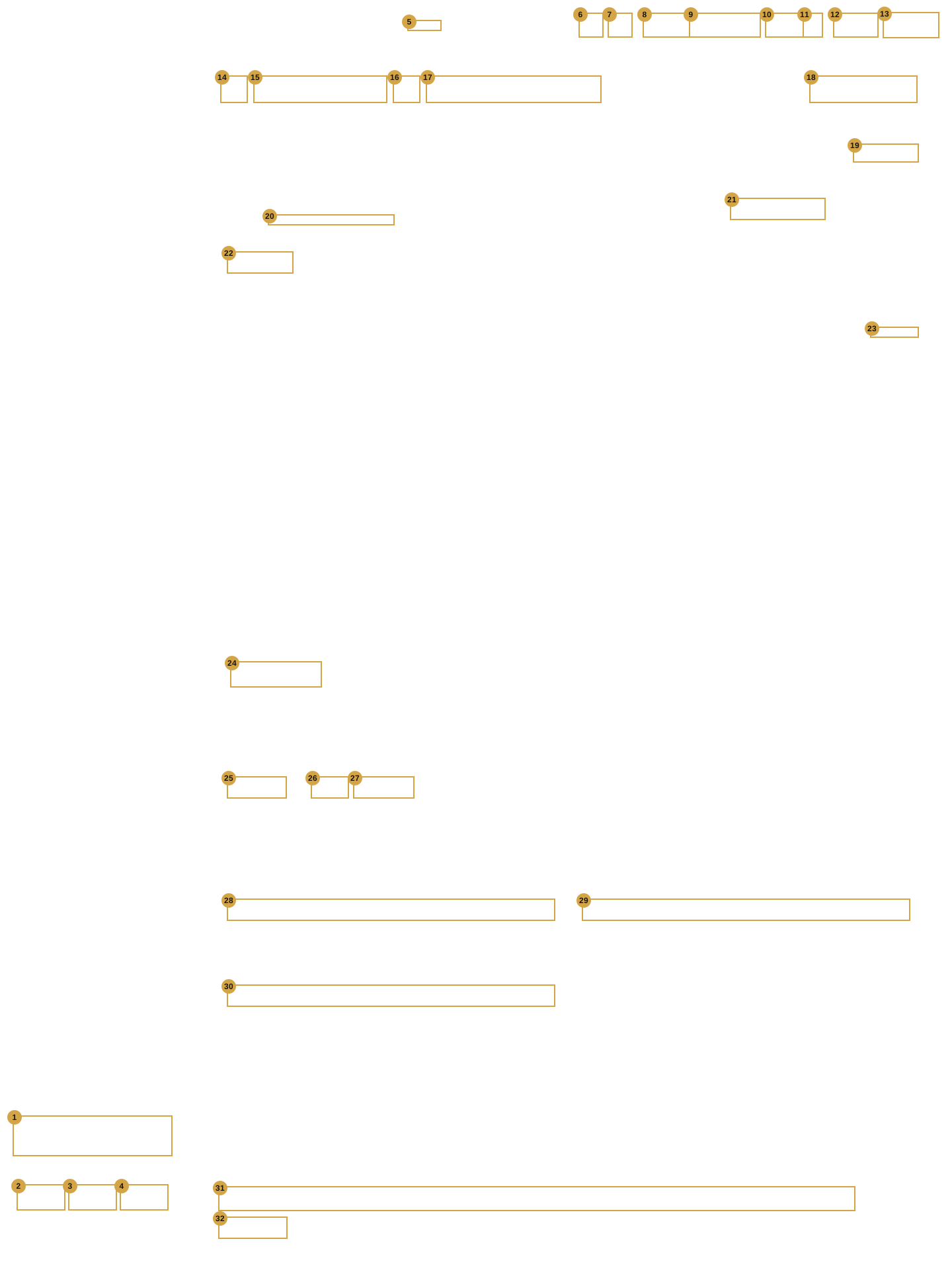
| # | Screen | Help entry |
|---|---|---|
| 1 | Shell | ? Help |
| 2 | Shell | Export |
| 3 | Shell | Open |
| 4 | Shell | New |
| 5 | Shell | Switch… |
| 6 | Shell | Tree |
| 7 | Shell | Preview |
| 8 | Shell | Cancel |
| 9 | Shell | Cancel & exit |
| 10 | Shell | Save |
| 11 | Shell | ▾ (More save options) |
| 12 | Shell | ← Back |
| 13 | Shell | Next → |
| 14 | Room Devices | ‹ (previous room) · › (next room) |
| 15 | Room Devices | Floor › Room ▾ (room picker) |
| 16 | Room Devices | Room tile button |
| 17 | Rooms | Room name |
| 18 | Rooms | Reorder (bar button) |
| 19 | Room Devices | Generate names / Replace all… |
| 20 | Room Devices | Addresses / Joins line (show or hide) |
| 21 | Room Devices | Source (light) |
| 22 | Room Devices | + Add light / + Add curtain |
| 23 | Room Devices | + Add scene |
| 24 | Room Devices | + Add a group |
| 25 | Room Devices | + Add AC |
| 26 | Room Devices | Qty (ACs to add) |
| 27 | Room Devices | + Add fan |
| 28 | Room Devices | TV brand |
| 29 | Room Devices | Amplifier / soundbar |
| 30 | Room Devices | Projector (None / Projector) |
| 31 | Room Devices | Door phone row |
| 32 | Room Devices | + Add a door |
TV & audio filled in (stand-in)