Device Import (step 4 of 7)
Device Import brings in devices that come from a system's own list, and sets up things the whole house shares. It has one tab per system: KNX, CoolMaster and Intesis (each shown only when that system is switched on in Project & Bridge), and Multi-zone amplifier (always shown).
Nothing here reaches the house or a phone until the next Save & Deploy.
Positions are in page pixels from the top-left of each picture. Where the capture has no control id for a box, or gives a box the id of the same-looking box on another tab, the id below was matched by hand from the label and the code, and is marked (by label).
The shared top bar and side bar (Save, Cancel, Back, Next, Help, steps) are described with the Shell controls, not here.
Intesis tab
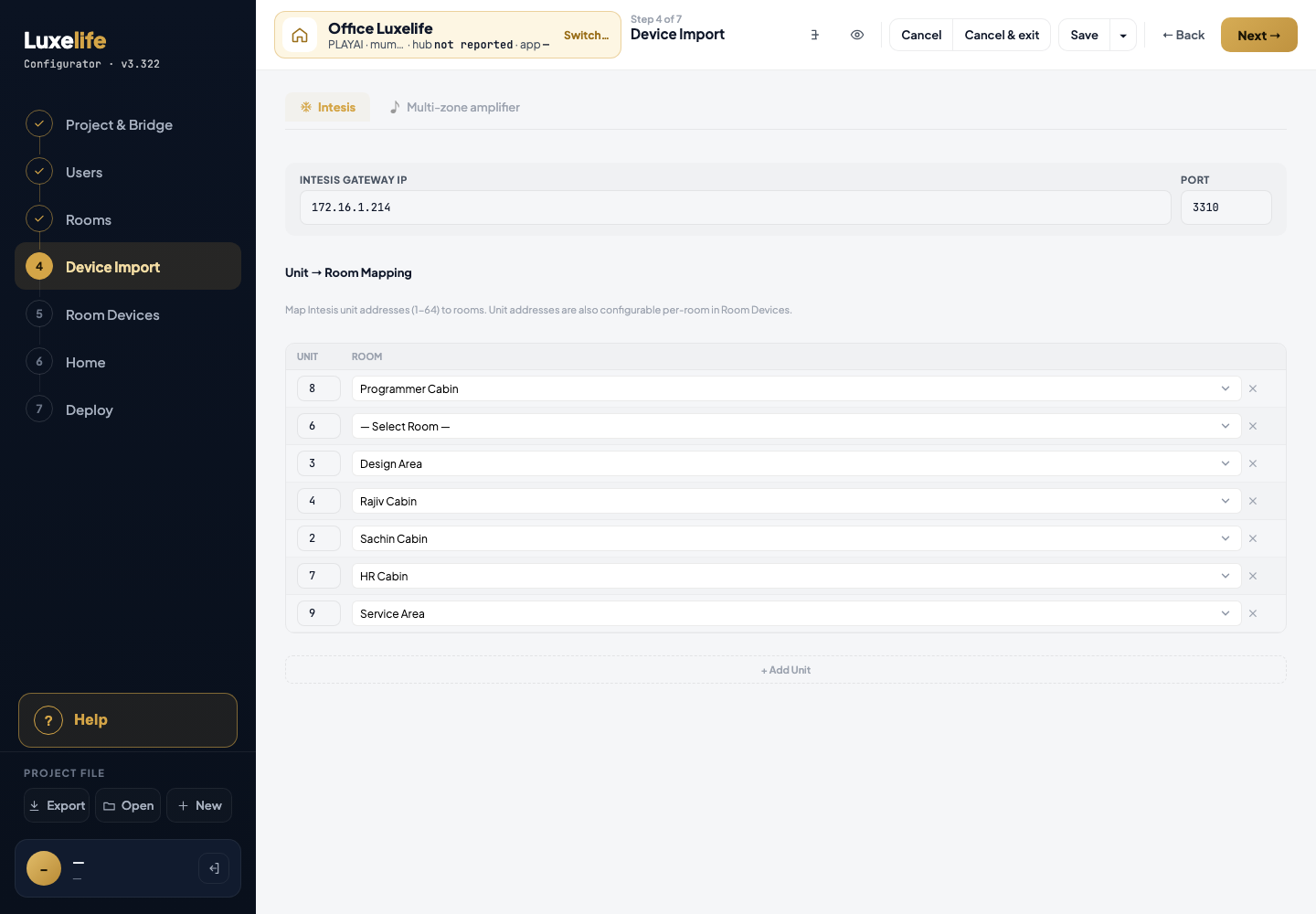
Captured on the Office test project; Intesis is its only import system.
| # | What you see | Where (x, y) | Help entry |
|---|---|---|---|
| 1 | Tabs Intesis, Multi-zone amplifier | 312, 101 | Tab |
| 2 | Intesis Gateway IP | 328, 208 | Intesis Gateway IP |
| 3 | Port | 1292, 208 | Port (Intesis) |
| 4 | Unit number on a row | 325, 411 | Unit |
| 5 | — Select Room — on a row | 385, 411 | Room (Intesis unit row) |
| 6 | ✕ on a row | 1359, 413 | Remove row |
| 7 | + Add Unit | 312, 717 | + Add Unit |
Rows 4 to 6 repeat for each unit. Note: Each row is a room's Intesis AC; Unit and Room edit the same AC as Room Devices.
KNX tab
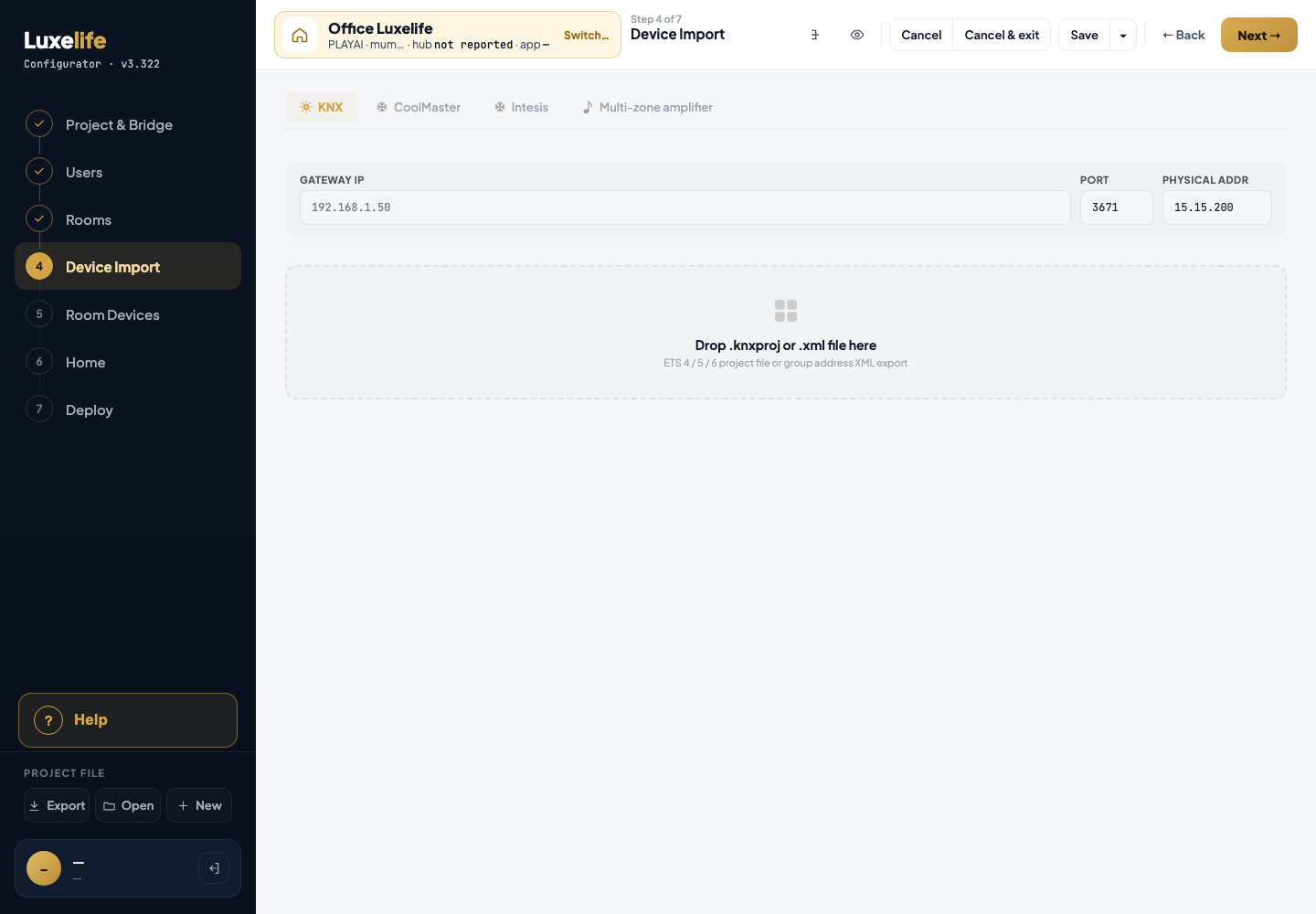
KNX and CoolMaster were switched on, empty, in the page only (Office has neither). No ETS file was loaded, so the review and imported lists are not drawn.
| # | What you see | Where (x, y) | Help entry |
|---|---|---|---|
| 1 | Tabs KNX · CoolMaster · Intesis · Multi-zone amplifier | 312, 101 | Tab |
| 2 | Gateway IP | 328, 208 | Gateway IP |
| 3 | Port | 1182, 208 | Port (KNX) |
| 4 | Physical Addr | 1272, 208 | Physical Addr |
| 5 | Naming help box Name it like this, and the import does the rest — not in this picture (added in v3.322, JOB-0388) | under the gateway bar, above the drop area (from the code) | How to name KNX group addresses |
| 6 | ✕ on the naming help box (hides it for the signed-in person) | top-right of the box (from the code) | ✕ (hide the naming help) |
| 7 | Full naming rules → | bottom-left of the box (from the code) | Full naming rules → |
| 8 | Drop .knxproj or .xml file here | below the naming help box, or below the gateway bar once the box is hidden (read from the picture) | Drop file |
KNX controls that are not in any capture
KNX import pop-ups and lists need a real ETS export, and the Office project has none (see the source notes named on the Source line). These entries are written from the code only:
- Review Discovered Devices (after dropping a first file): status offer Fill N / Not now; per row Category (lights), Category (curtains), Type (ACs); Room for lights, curtains, ACs; Name for lights, curtains, ACs; remove x for lights, curtains, ACs; curtain addresses ↑ Open, ↓ Close, Stop, % Pos, ◎ Pos st; **+ Map curtain; Split.
- AC proposal line: Combine into one AC, Not now.
- AC and fan boxes: address box, to confirm, Fan type, Speeds, Speed type.
- Confirm bar: Confirm Import, Cancel.
- Imported KNX Devices (after Confirm): Edit Import / Done, Edit Import to assign →, **+ Map curtain, Clear All KNX Devices; light/curtain rows Type, Room, Name, ✕, address slot, Edit, Split; AC/fan rows Type, Room, Name, ✕.
- Map curtain sheet: the sheet, Name, Room, ✕, Filter, show all / curtains only, role dot, Cancel, Save curtain.
- Re-import (a file dropped on a project that already has an import): Close, Type, Room, changed tick, remove tick, Cancel, Confirm.
CoolMaster tab
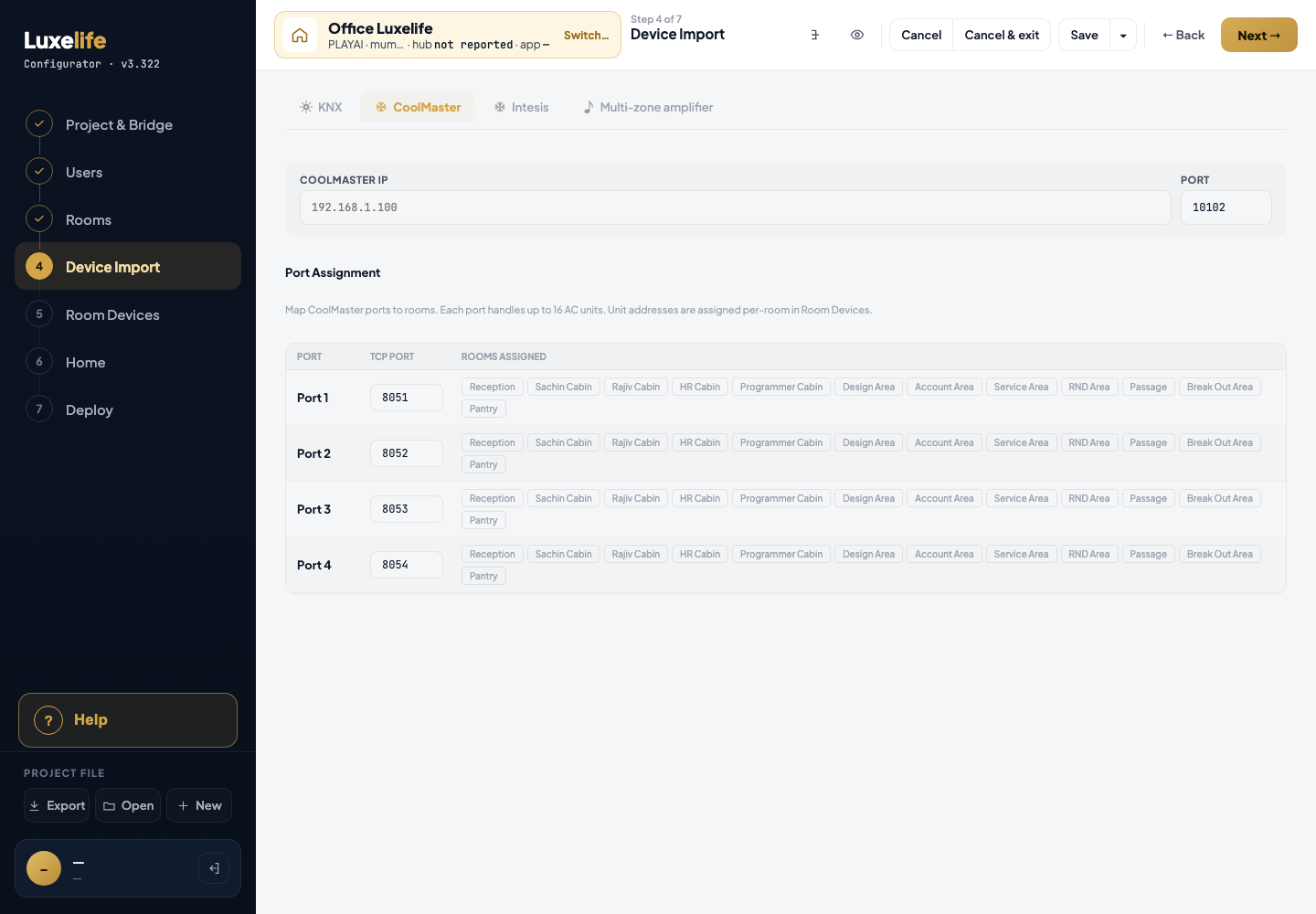
CoolMaster switched on, empty, in the page only.
| # | What you see | Where (x, y) | Help entry |
|---|---|---|---|
| 1 | CoolMaster IP | 328, 208 | CoolMaster IP |
| 2 | Port | 1292, 208 | Port (CoolMaster) |
| 3 | TCP Port on Port 1 (8051) | 405, 420 | TCP Port |
| 4 | Room chip, e.g. Reception | 505, 413 | Room chip |
Rows 3 and 4 repeat for Port 1 to Port 4. Note: The TCP Port and room chips are sent to the hub (when the Crestron processor has an address) and shown in the Homeowner Guide.
Multi-zone amplifier tab
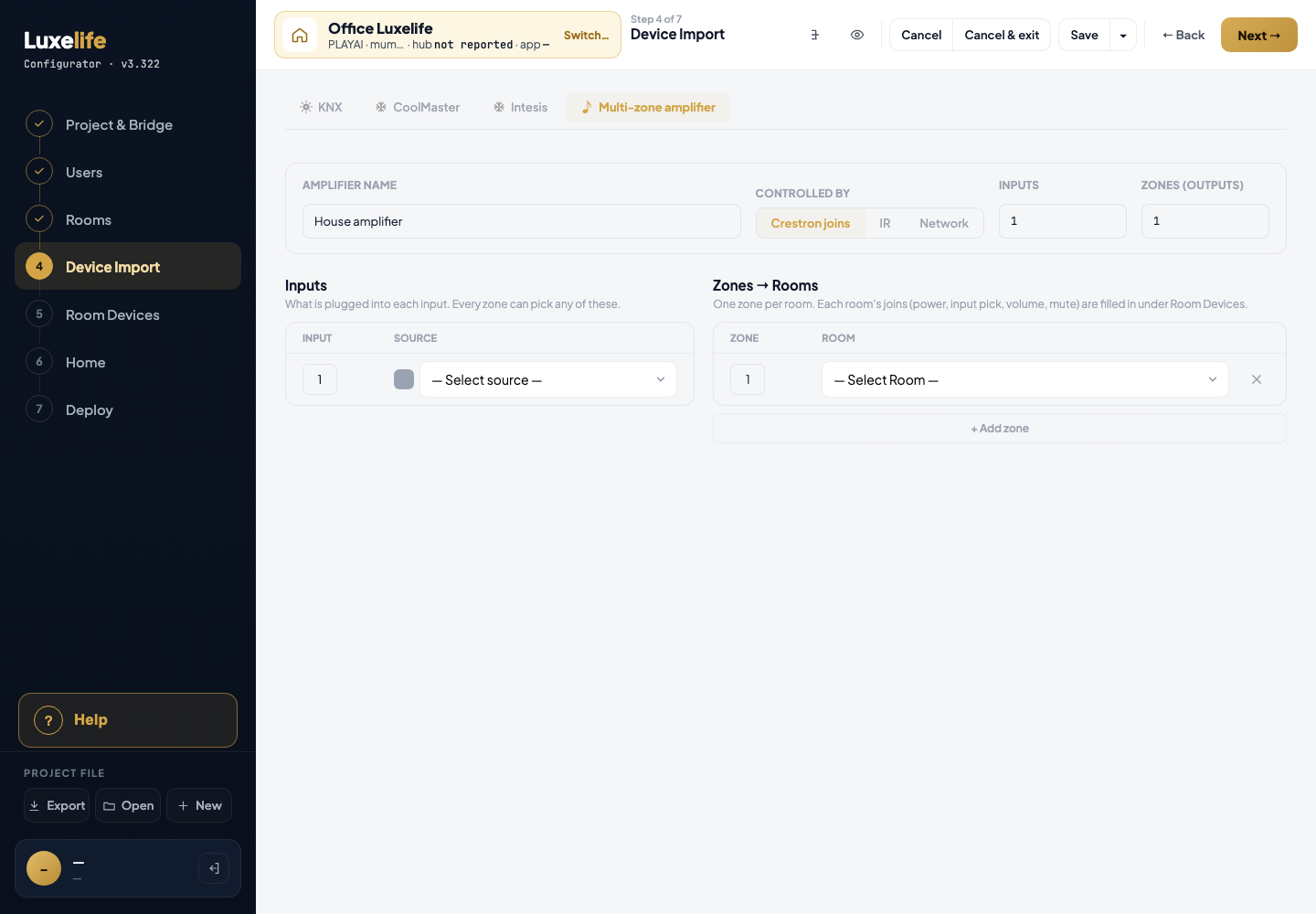
| # | What you see | Where (x, y) | Help entry |
|---|---|---|---|
| 1 | Amplifier name House amplifier | 331, 223 | Amplifier name |
| 2 | Controlled by: Crestron joins · IR · Network | 828, 228 | Controlled by |
| 3 | Inputs | 1093, 223 | Inputs |
| 4 | Zones (outputs) | 1249, 223 | Zones |
| 5 | — Select source — on input 1 | 459, 395 | Source |
| 6 | — Select Room — on zone 1 | 899, 395 | Room (zone) |
| 7 | ✕ on zone 1 | 1361, 401 | Remove zone |
| 8 | + Add zone | 780, 452 | + Add zone |
Each room's joins for its zone (power, input pick, volume, mute) are filled under Room Devices, not here.
Other
- Project & Bridge link in No integration systems enabled: not reachable in this version, because the Multi-zone amplifier tab is always shown.