The configurator's frame (top bar, sidebar, session boxes)
These controls are on every step. The numbers in the picture match the rows below. The picture was taken on 25 Oct 2026 with Office test data. PINs and e-mail addresses are hidden. Each control has its own help page.
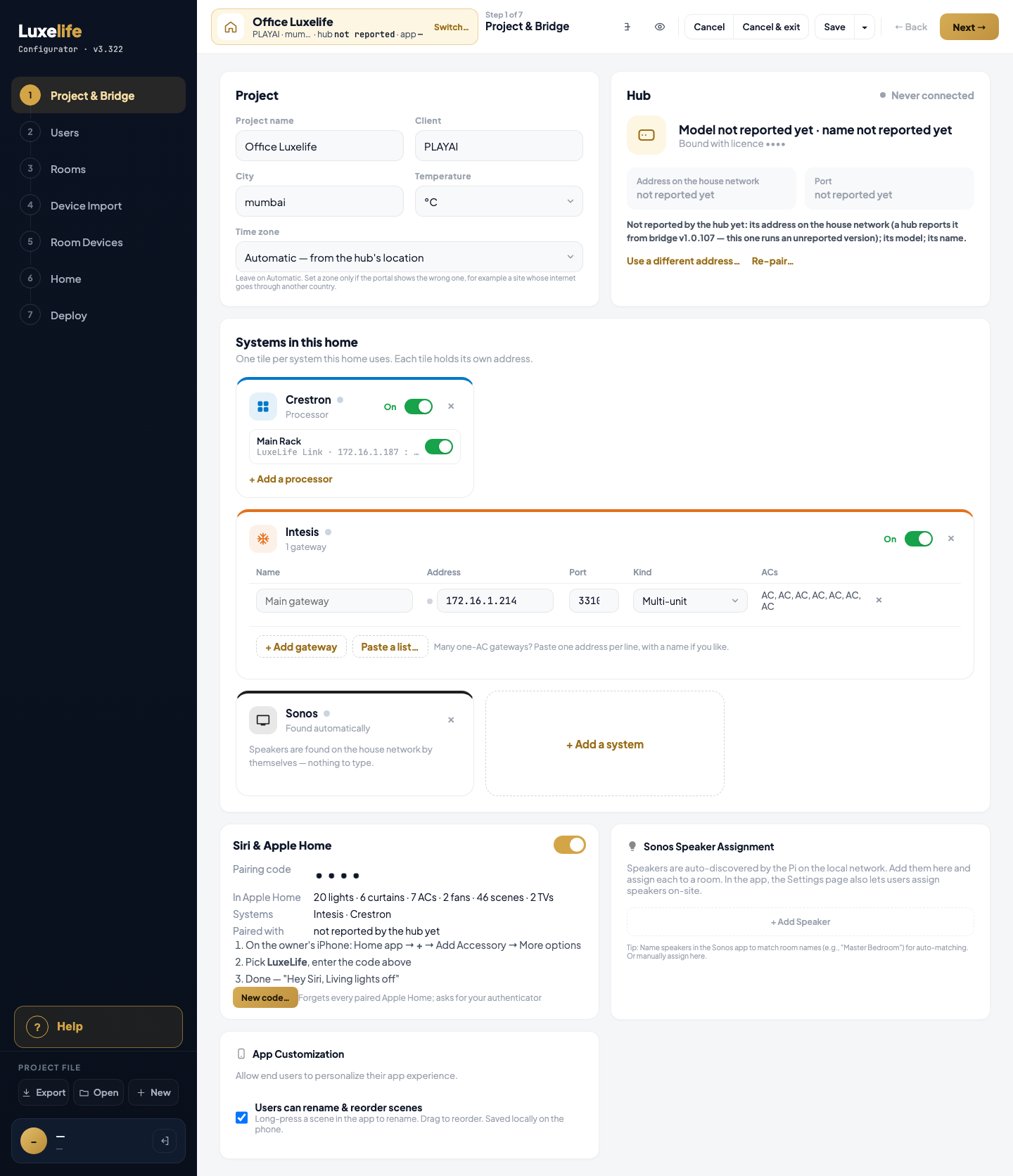
Top bar
| # | On screen | Box (x, y, w, h) | Help page |
|---|---|---|---|
| 1 | Switch… (beside the project name) | 617, 31, 50, 15 | Switch… |
| 2 | Tree | 876, 20, 36, 36 | Tree |
| 3 | Preview | 920, 20, 36, 36 | Preview |
| 4 | Cancel | 973, 20, 70, 36 | Cancel |
| 5 | Cancel & exit | 1043, 20, 107, 36 | Cancel & exit |
| 6 | Save | 1158, 20, 57, 36 | Save |
| 7 | ▾ (More save options) | 1215, 20, 29, 36 | ▾ (More save options) |
| 8 | ← Back | 1261, 20, 67, 36 | ← Back |
| 9 | Next → | 1336, 19, 84, 38 | Next → |
The ▾ menu (7) holds: Save & exit (Save & exit), Save a copy… — always greyed (Save a copy…), Export project file (Export project file). The menu is not open in the capture.
The Project Tree panel opened by Tree (2) has Expand all (Expand all) and ✕ (✕ (Close tree)). Not open in the capture.
Left sidebar
| # | On screen | Box (x, y, w, h) | Help page |
|---|---|---|---|
| 10 | ? Help | 20, 1430, 240, 60 | ? Help |
| 11 | Export (Project file) | 26, 1534, 72, 38 | Export |
| 12 | Open (Project file) | 104, 1534, 72, 38 | Open |
| 13 | New (Project file) | 182, 1534, 72, 38 | New |
Below these, at the foot of the sidebar: your name and company, Add your name when no name is set (Add your name), and the sign-out icon (Sign out (sidebar)). Their boxes were not matched in the capture. Open (12) uses a hidden file picker (File picker (hidden)).
Session boxes
Picture: the Cancel your changes? box:
| # | On screen | Box (x, y, w, h) | Help page |
|---|---|---|---|
| 14 | Keep editing | 635, 840, 120, 40 | Keep editing |
| 15 | Discard changes | 765, 840, 147, 40 | Discard changes |
Picture: the Still working on …? box (shown after 30 minutes with no use; the project is saved and freed at 35 minutes):
| # | On screen | Box (x, y, w, h) | Help page |
|---|---|---|---|
| 16 | Save & exit now | 600, 872, 156, 40 | Save & exit now |
| 17 | Keep working | 765, 872, 141, 40 | Keep working |
Picture: the Save & Deploy box:
| # | On screen | Box (x, y, w, h) | Help page |
|---|---|---|---|
| 18 | Cancel | 790, 875, 81, 37 | Cancel (Save & Deploy) |
| 19 | Save & Deploy (right of Cancel) | not matched in the capture | Save & Deploy |
Not captured (no screenshot)
These need a real sign-in or a state the capture could not reach. Each still has its help page.
- New-version strip: Refresh now (Refresh now), Later (Later).
- Sign in card: Continue with Google, Continue with Microsoft, Email address, Email me a code, code boxes, 6-digit code, Change email, Resend code.
- Account awaiting activation: Sign out, Save details. Account inactive: Sign out.
- Your projects: Sign out, + New project, Search projects, sort Date · Customer · Location.
- This project is busy: ← Back to projects, Force open, Yes, force open.
- Name this machine: name box, Skip, Save & continue.
- Template too old: Cancel, Go to Export step.
- Confirm it's you: code boxes, code, Cancel, Continue. Publishing needs an authenticator: Cancel, Set up in the portal ↗.
- Home guide (separate page for the homeowner): Download PDF, room row, question row.
Not controls, or never shown
- Not a control (style note) and Not a control (code note) are words inside notes in the code, not controls.
- The Other (not reached from a step) group — old system tiles, old KNX boxes, an old room-access table, old source tiles, an old home pill — is code that is never called in this version, so it is never on screen. Each has a page that says so.